For field sales teams, attendance is not just about clocking in it defines productivity, territory coverage, and execution quality.
When attendance data is scattered across reports or reviewed after the fact, managers lose the ability to act in time. An Attendance Dashboard inside SFA software solves this by delivering clear, real-time attendance visibility for field sales operations.
Why Field Sales Teams Need a Dedicated Attendance Dashboard?
Unlike office-based teams, field sales representatives operate across cities, territories, and market locations. Traditional attendance methods fail to capture this complexity. A dedicated Attendance Dashboard for field sales teams provides:
- Centralized attendance visibility
- Instant identification of compliance gaps
- Data consistency across attendance, market visits, and reporting
Instead of manual follow-ups, managers can monitor attendance behavior directly from the SFA portal.
What Is the Attendance Dashboard?
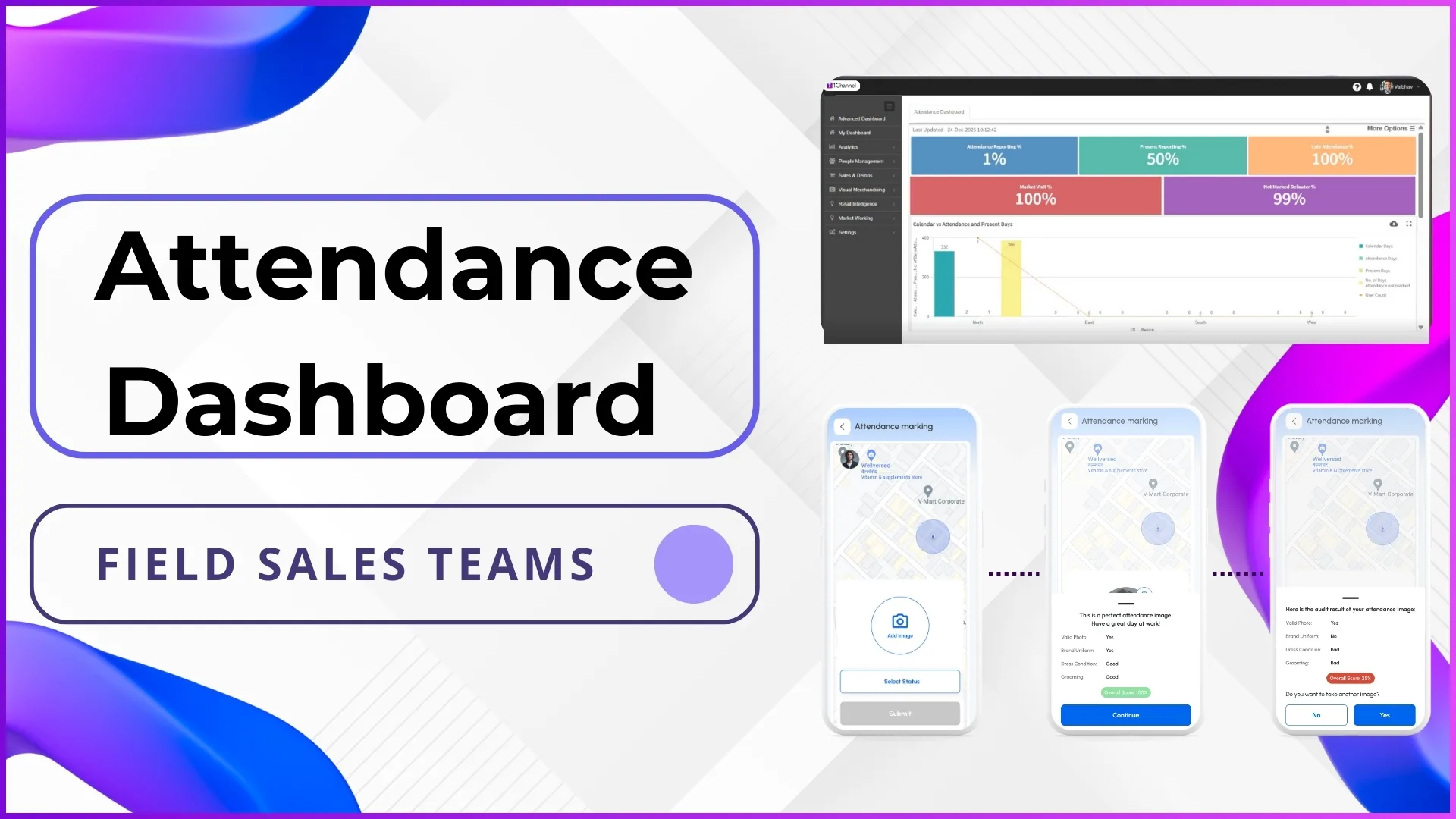
The Attendance Dashboard is a data-driven visual interface that summarizes attendance performance across the field force.
It pulls attendance data submitted through the SFA system and presents it in measurable formats that managers can immediately interpret.
The dashboard is designed to answer key operational questions:
- How many users reported attendance today?
- How many are present versus late or missing?
- Are attendance norms being followed consistently?
Key Attendance Metrics Available on the Dashboard
The Attendance Dashboard displays multiple attendance-related indicators that help track field discipline:
Attendance Reporting Percentage
Shows how many employees have reported attendance against the total active users.
Present Attendance Percentage
Highlights the percentage of employees marked present, helping teams distinguish between reporting and actual presence.
Late Attendance Percentage
Tracks users who have reported attendance after the defined time window, enabling timely corrective action.
Not-Marked Attendance Defaulters
Identifies users who failed to report attendance, making it easier to spot non-compliance on the same day.
These metrics ensure managers do not rely on end-of-day or end-of-month reports.
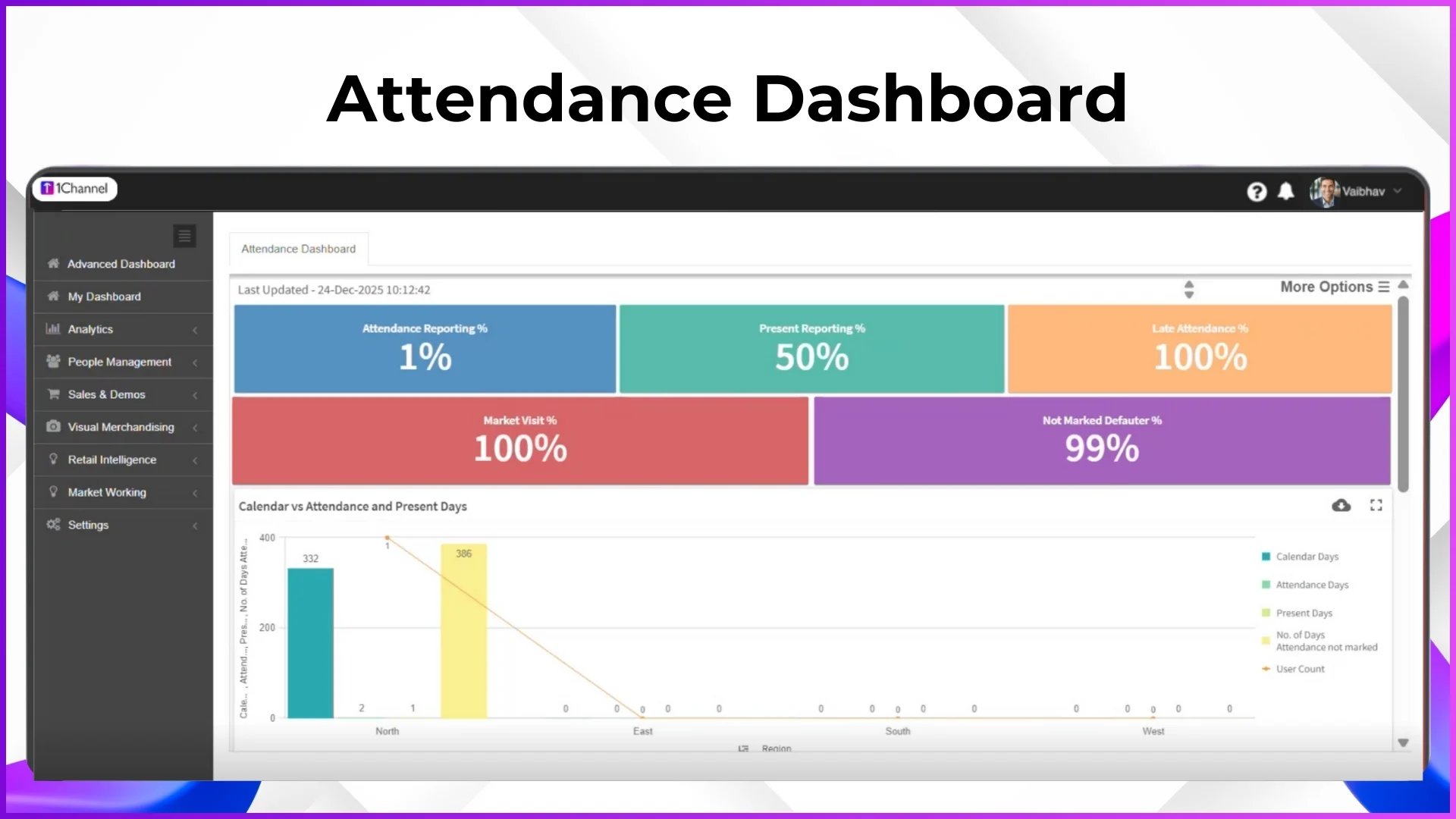
Calendar vs Attendance Present Days View
The Attendance Dashboard includes a calendar vs attendance present days comparison, allowing managers to see:
- Total calendar working days
- Days attendance was reported
- Actual present days
- Missed or defaulted days
This view is especially useful for:
- Payroll verification
- Monthly attendance audits
- Identifying habitual defaulters
Employee-Level Attendance Compliance Visibility
Beyond summary metrics, the Attendance Dashboard provides employee-level attendance compliance details, including:
- Employee code and name
- Status and role
- City-wise presence
- Attendance percentages
- Missed, late, and defaulted attendance counts
This allows managers to move from high-level trends to individual accountability without switching screens or downloading reports.
Filtering Attendance Data for Focused Analysis
To support large and distributed sales teams, the Attendance Dashboard offers powerful filters, enabling users to analyze attendance by:
- Employee code
- Employee name
- Status
- Role
- City
These filters help managers isolate attendance patterns for specific regions, roles, or teams and take targeted actions.
Attendance Analytics for Better Decision-Making
The Attendance Dashboard is backed by attendance analytics, helping managers understand patterns rather than isolated incidents. By analyzing missed days, late reporting, and defaulter trends, teams can:
- Identify recurring attendance issues
- Compare performance across locations
- Improve discipline through data-backed discussions
This analytical approach turns attendance into a measurable performance input.
Role-Based Access for Secure Attendance Monitoring
Access to the Attendance Dashboard is controlled through role-based permissions:
- Managers and admins view consolidated attendance data via the portal
- Field employees access only their own attendance data through the mobile app
This ensures data privacy while maintaining transparency across the organization.
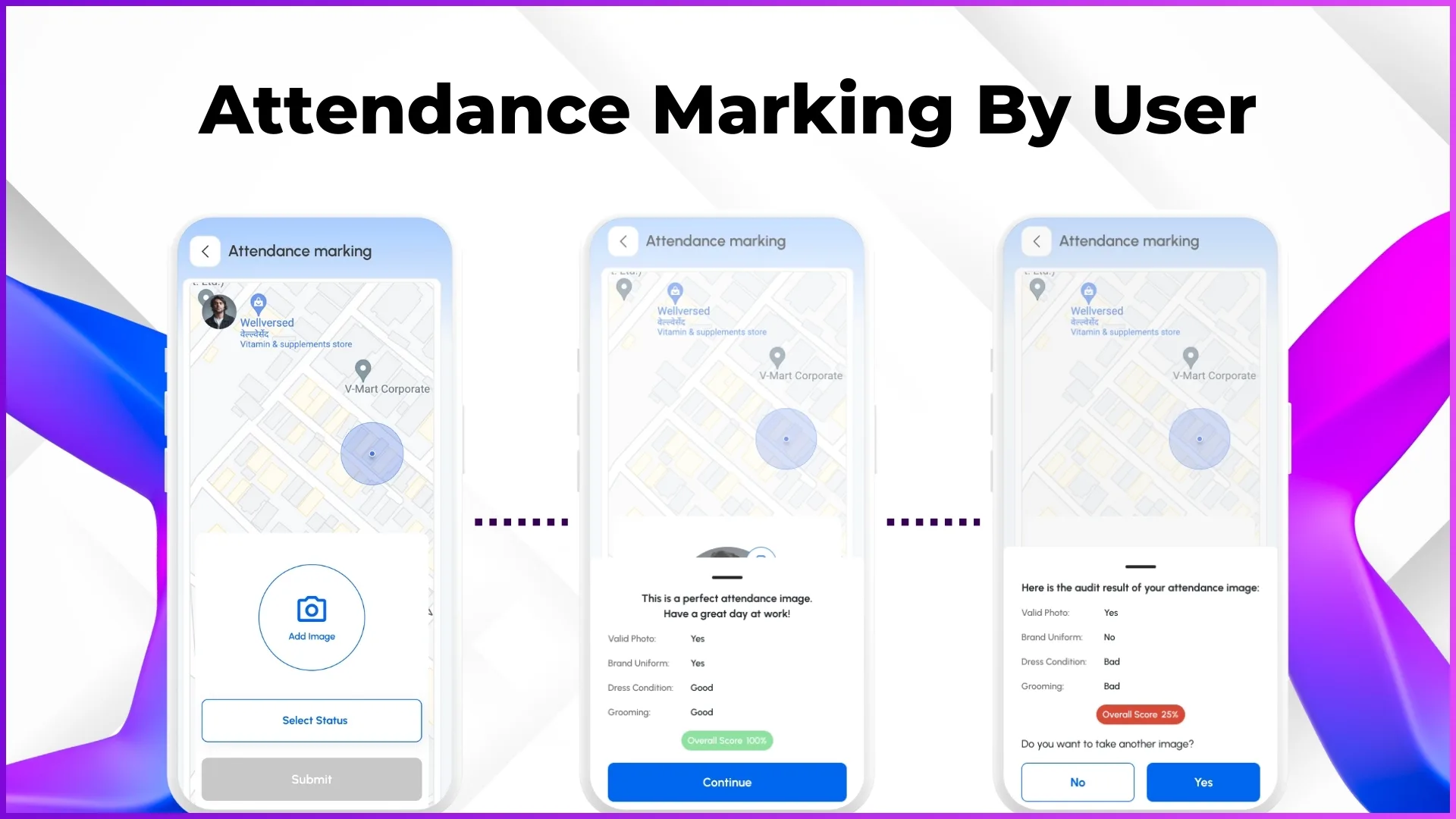
How the Attendance Dashboard Improves Field Sales Execution
By centralizing attendance data and making it actionable, the Attendance Dashboard helps organizations:
- Improve reporting discipline
- Reduce attendance-related payroll errors
- Increase field visibility
- Strengthen manager accountability
- Support consistent market coverage
Attendance stops being a back-office process and becomes a core execution metric.
Final Thoughts
The Attendance Dashboard for Field Sales Teams acts as the foundation of operational visibility in SFA software.
By combining real-time metrics, employee-level compliance, analytics, and role-based access, it enables managers to monitor, analyze, and act on attendance data without delay.
For organizations managing distributed field sales teams, a dedicated attendance dashboard is not optional it is essential.