

Our Customers



















Why Choose 1Channel Sales Force Automation Software?
How Our Sales Force Automation Software Works
Complete field sales automation system with portal-based admin configuration and mobile field execution—configure users/stores/products/beat plans from Settings, field teams execute attendance/visits/sales via mobile app, data flows to Analytics for real-time reporting, and People Management handles leaves/expenses/approvals across the organization hierarchy.
- Portal Setup & Configuration
- Mobile Field Execution
- Data Collection & Tracking
- Analytics & Reporting
Sales Force Automation Insights & Resources
Expert perspectives on field sales automation, beat planning, AI-powered analytics, and outlet coverage strategies
User Management & Organization Hierarchy
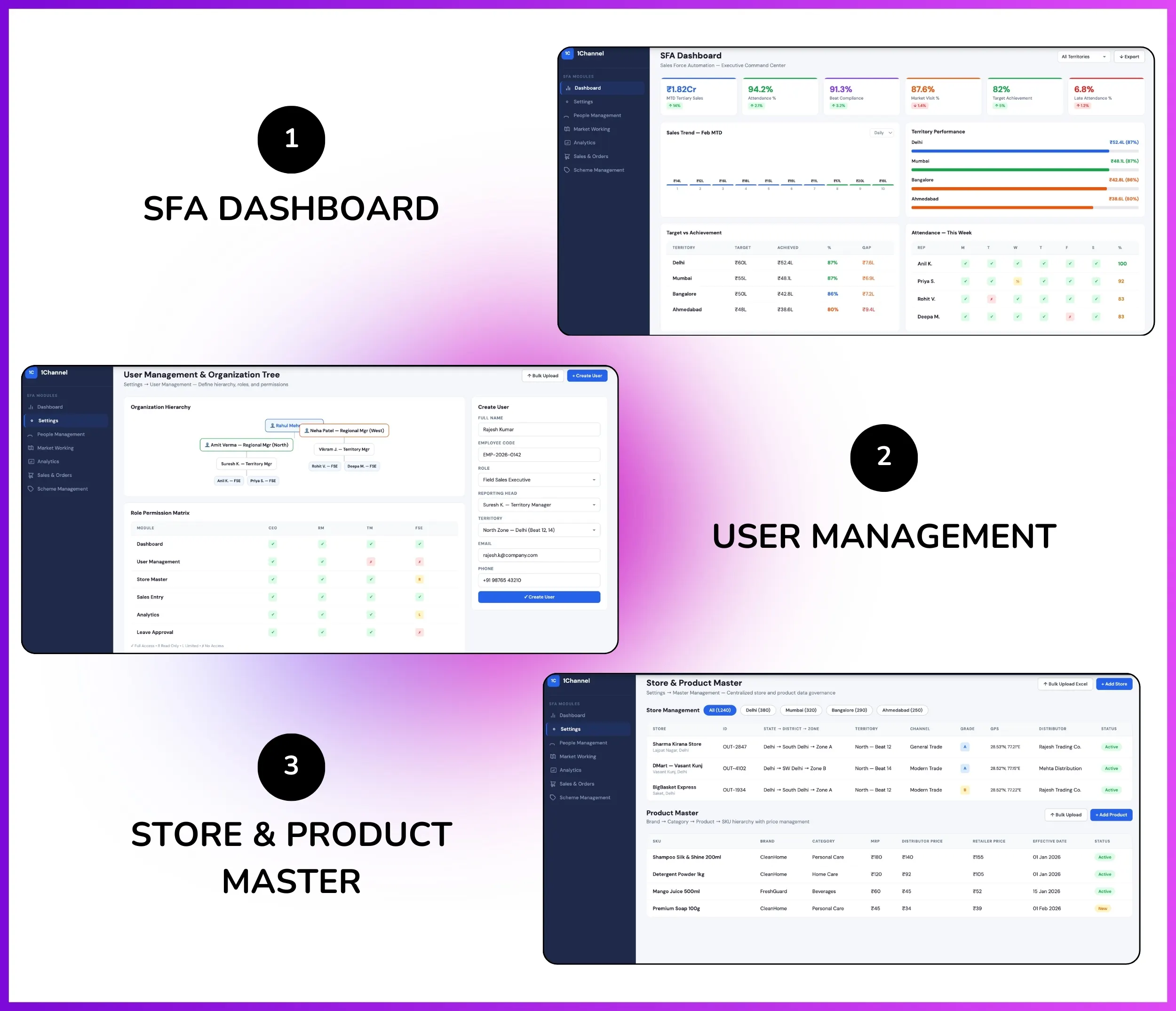
Admin creates user hierarchy from Settings → User Management with Organization Tree showing complete reporting structure—"visualize who reports to whom across the organization tree" from field promoters to regional heads—defining Roles with module-level access control (attendance, sales, visits, analytics) and territory-based assignments ensuring users access only their assigned stores and data.
How User Creation Works:
- Admin navigates to Settings → User Management → Create User
- Fills user details: name, email, phone, employee code, designation
- Selects reporting head from Organization Tree dropdown—defines "who will be approving the leaves" and expense claims
- Assigns Role: Field Sales Executive, Territory Manager, Regional Manager, Admin—each role has pre-configured module access permissions
- Maps territories: assigns specific regions/zones/territories accessible to this user
- System auto-generates login credentials and sends email/SMS to user for first-time login and password setup
Organization Tree & Reporting Hierarchy:
- Visual Hierarchy Tree — Displays complete organization structure with expandable/collapsible nodes showing reporting relationships from CEO to field promoters
- Approval Workflows — Leave applications, expense claims, attendance regularizations automatically route to reporting head based on organization tree hierarchy
- Data Access Control — Managers see data only for their direct and indirect reportees as per organization tree; field users see only their own data
- Role-Based Permissions — Settings → User Management → Roles defines module access: Admin (all modules), Manager (analytics + approvals), Field User (mobile app + work summary)
- Territory Mapping — Each user assigned specific territories in hierarchy (State → District → Zone → Territory) ensuring beat plan and store assignment accuracy
- Bulk User Upload — Upload Excel file with user details, reporting head mapping, and territory assignments for mass user creation with built-in validations
Note: Organization tree defines complete approval workflows, data visibility, and access control across attendance, leave, expense, and analytics modules—foundational for multi-level field sales team management.
Attendance Management with AI Validation
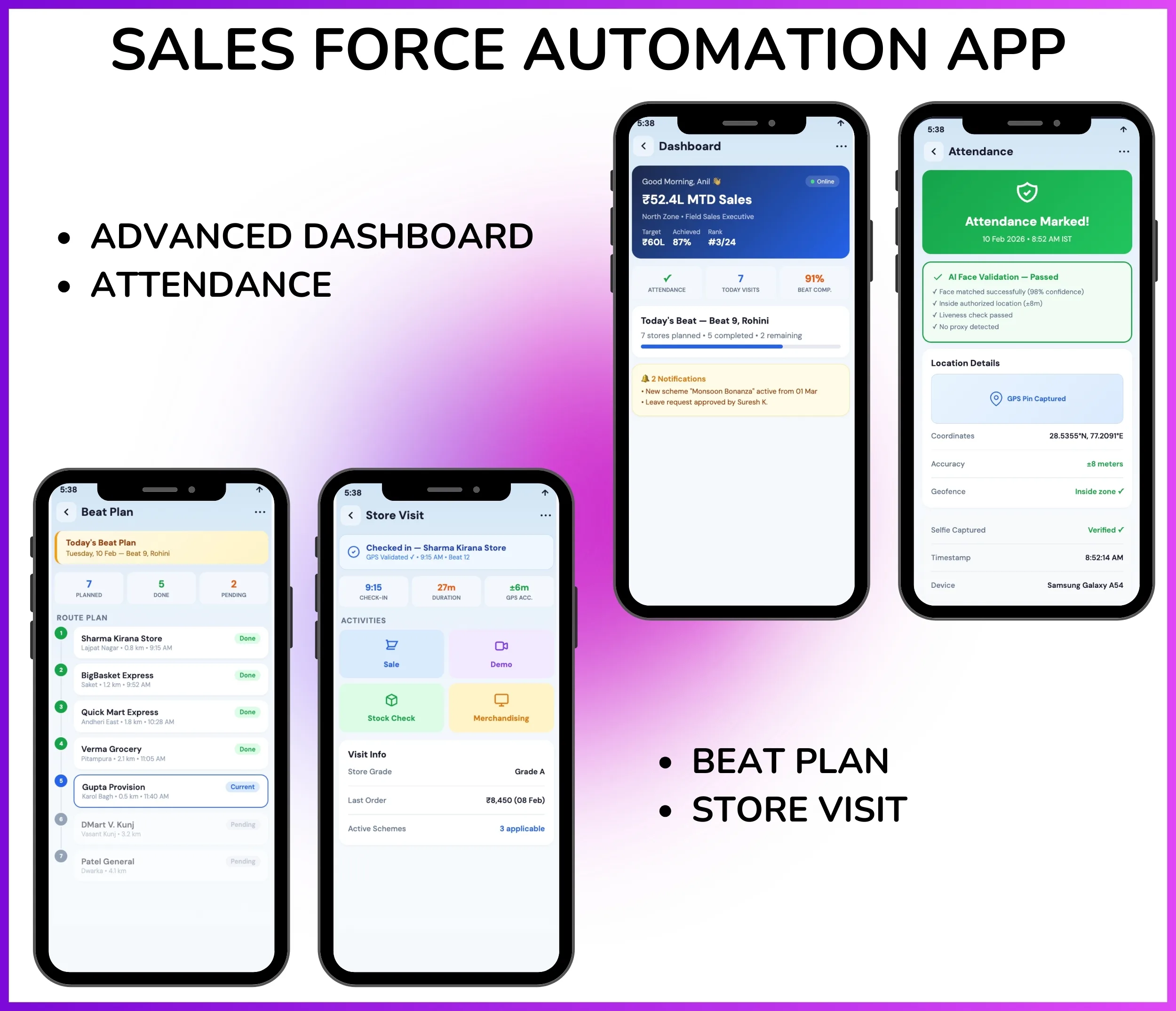
Field employees mark attendance via mobile app with AI photo validation and geofencing to prevent proxy marking, ensuring accurate attendance tracking with complete audit trails for payroll integration.
- AI Photo Validation: Real-time facial recognition matches employee selfies with reference images to prevent proxy attendance
- Geofencing: Restrict attendance marking to authorized locations only with GPS coordinate validation
- Late Attendance Tracking: Monitor punctuality trends with late attendance percentage dashboards for manager oversight
- Regularization Workflows: Mobile requests for missed check-ins with approval routing via organization hierarchy
- Audit Trails: Complete records with GPS coordinates, timestamps, photos, and device IDs for compliance
- Payroll Integration: Attendance closure feature locks monthly data for seamless HRMS/payroll system integration
Beat Planning & Market Visit Scheduling
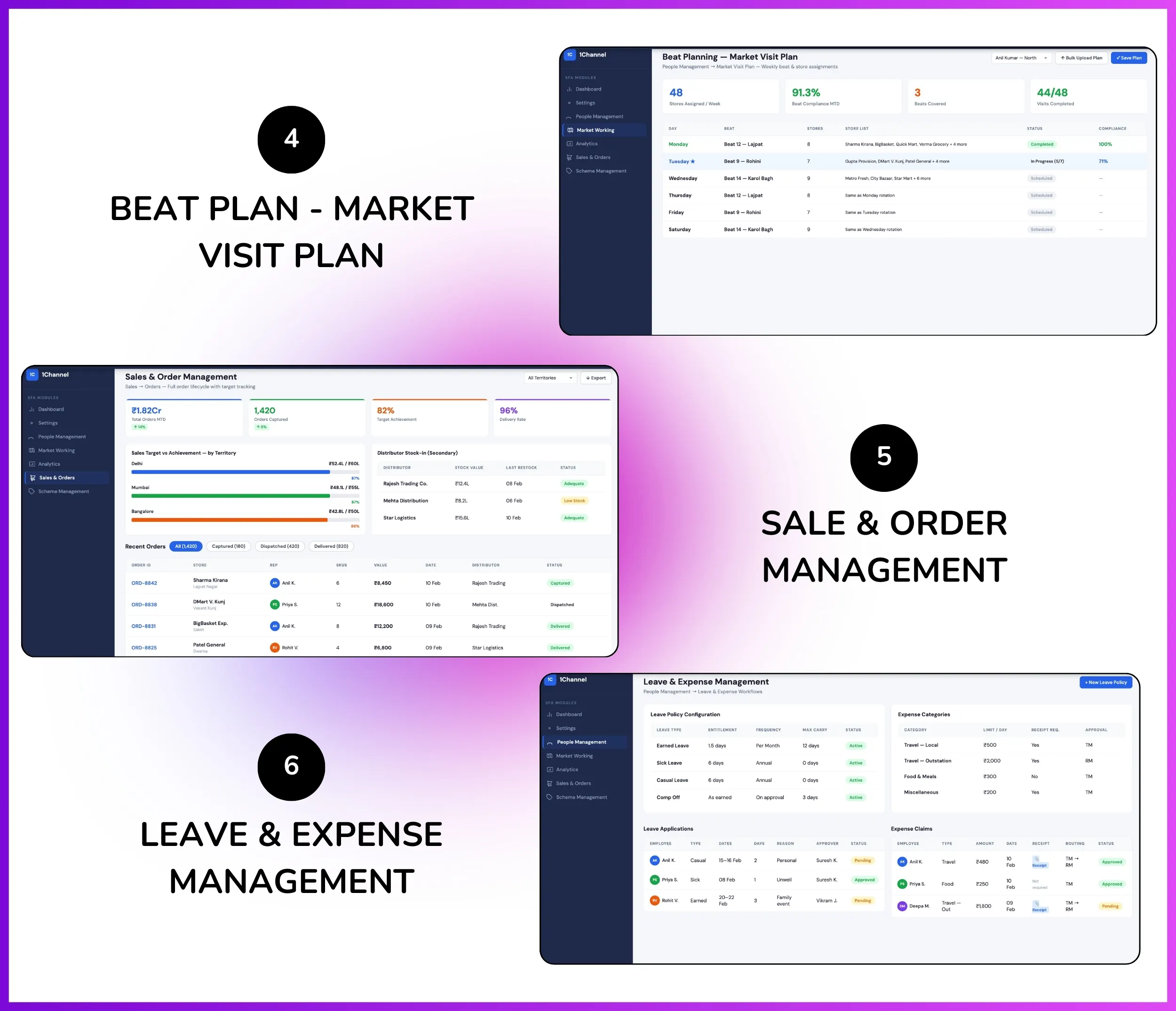
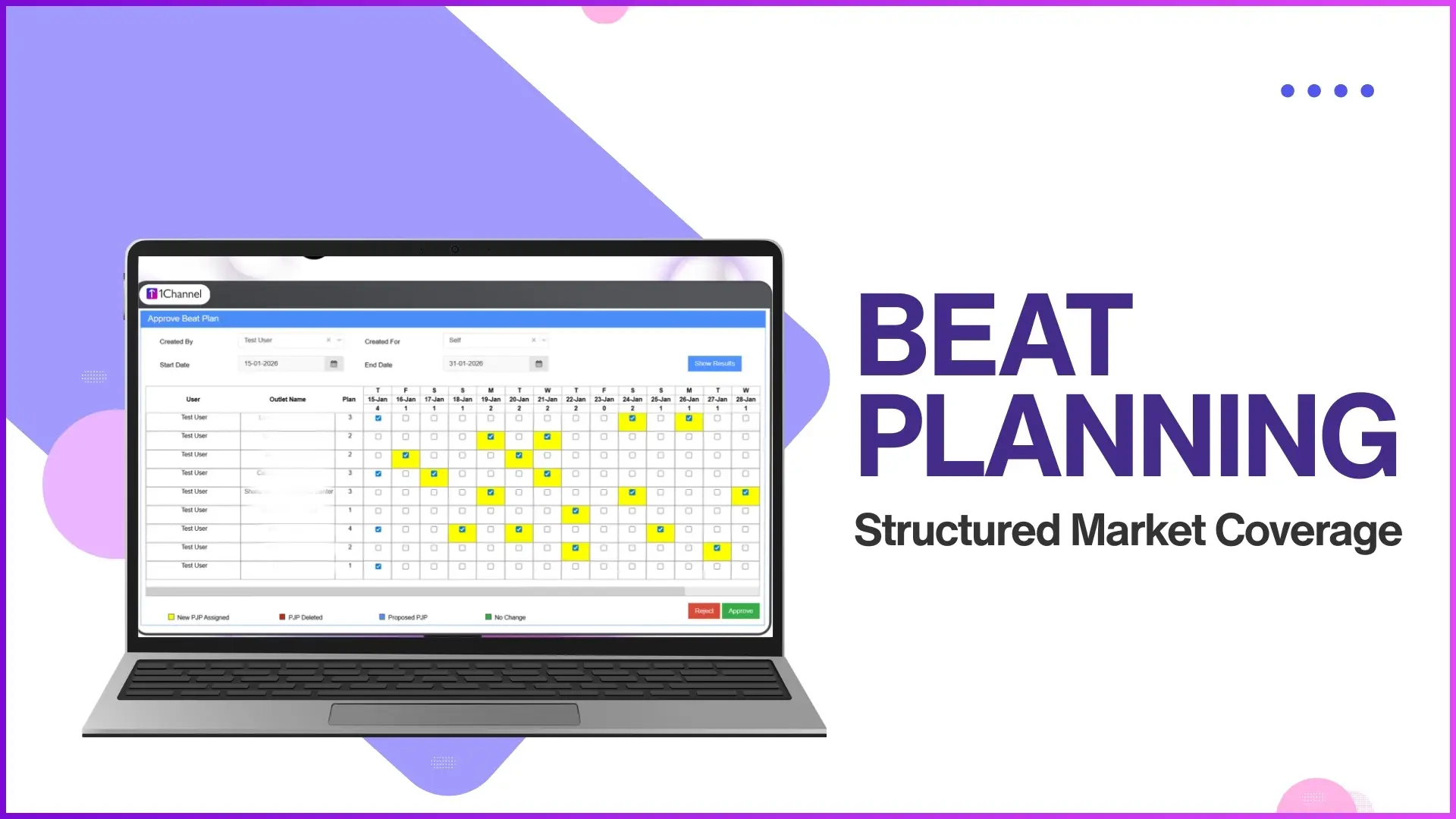
Admins create weekday beat plans from People Management → Market Visit Plan—"Market visit plan according to the weekdays like for Monday, Tuesday, Wednesday"—assigning store-wise visit schedules per employee ensuring systematic territory coverage, beat compliance reporting shows "number of stores covered in a day divided by number of stores defined in beat plan for that day," and field teams follow structured routes eliminating random visits.
Creating Beat Plans:
- Admin goes to People Management → Market Visit Plan → Upload Market Visit Plan (by Store and User)
- Defines weekday schedules: Monday stores, Tuesday stores, Wednesday stores for each field employee ensuring complete territory coverage
- Bulk upload via Excel: columns for User ID, Weekday (Monday/Tuesday/etc.), Store ID—system validates user and store exist in master data
- Individual assignment: Select user, select weekday, multi-select stores from dropdown for quick beat plan creation
- Flexible scheduling: Same store can be assigned to multiple users or different weekdays based on visit frequency requirements
- Territory-based filtering: Upload beat plans filtered by territory/zone ensuring users only see stores in their assigned regions
Beat Compliance Tracking:
- Beat Compliance Report: Analytics → Report Catalog → Beat Compliance shows "number of stores covered in a day divided by number of stores defined in beat plan for that day"
- Visit Productivity Report: Analytics → Report Catalog → Visit Reports displays "daily count of stores visited by each field employee" compared to planned visits
- Mobile App Beat View: Field employees view today's beat plan in mobile app showing store list, addresses, GPS coordinates, and check-in status
- Route Optimization: App shows stores in geographical order for optimized travel routes reducing transit time between visits
- Visit Alerts: Push notifications remind employees of pending visits for the day if beat plan not completed by cutoff time
- Manager Dashboard: Advanced Dashboard shows team-wise beat compliance percentage for real-time monitoring and corrective action
Note: Beat planning ensures systematic market coverage eliminating random visits while beat compliance tracking identifies gaps in territory servicing for manager intervention.
Store & Product Master Data Management
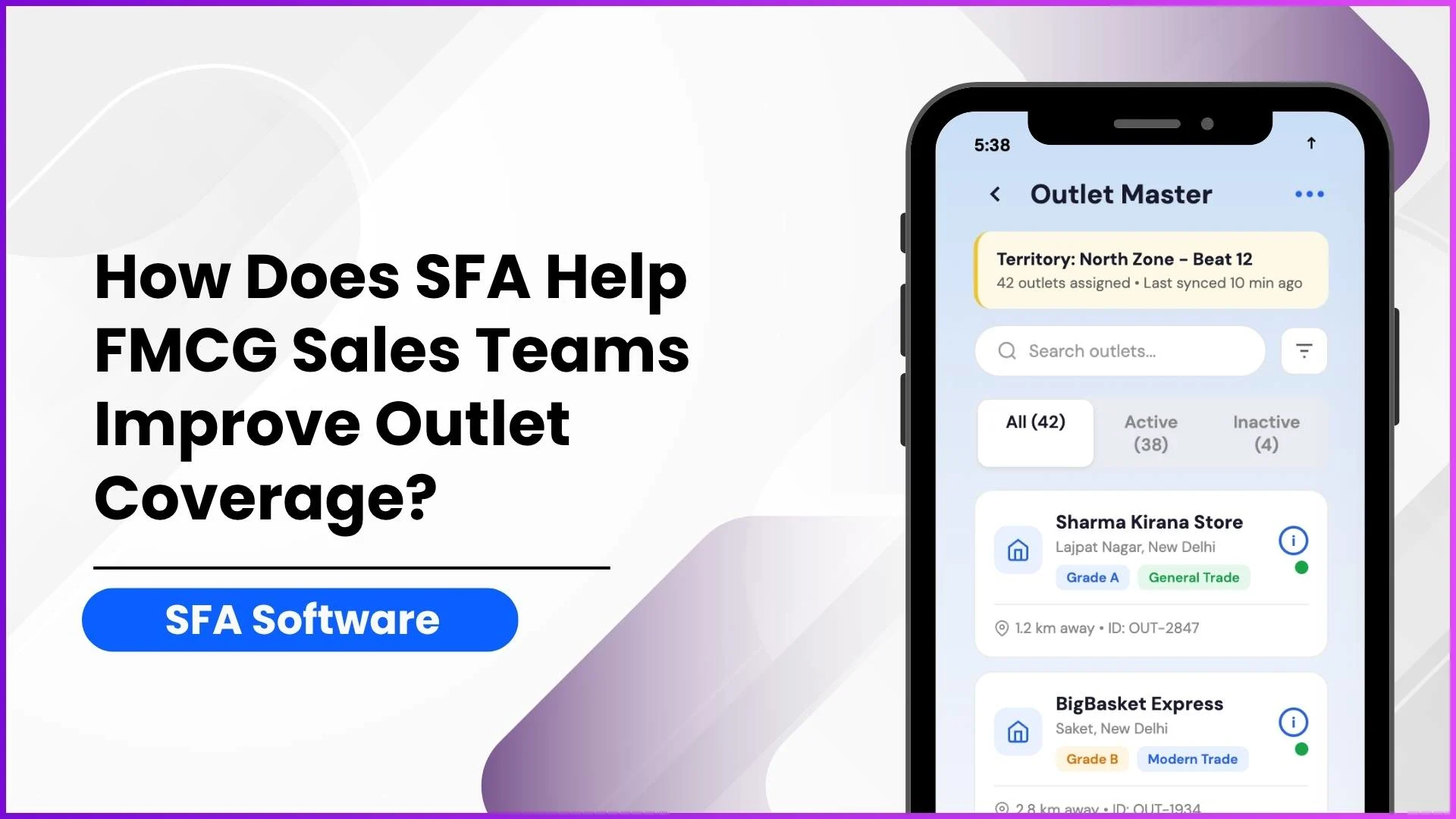
Admins maintain single source of truth for stores and products—territory-based store assignments with GPS validation, channel classifications for analytics, and complete product hierarchy with pricing for accurate order capture.
- Territory Hierarchy: Assign stores to State → District → Zone → Territory levels for geographical filtering and reporting
- GPS Coordinates: Store locations with latitude/longitude for GPS-validated visit verification
- Channel Classification: Tag stores as Modern Trade, General Trade, Pharmacy, Kirana Shop, or Institution for channel-wise analytics
- Product Hierarchy: 4-level structure—Brand → Product Category → Product → SKU (e.g., Dove → Shampoo → Anti-Dandruff → 200ml)
- Price Master: Define MRP, distributor price, and retailer price per SKU with effective date ranges
- Bulk Upload: Upload store and product master data via Excel with built-in validations for format and duplicates
Sales & Order Management
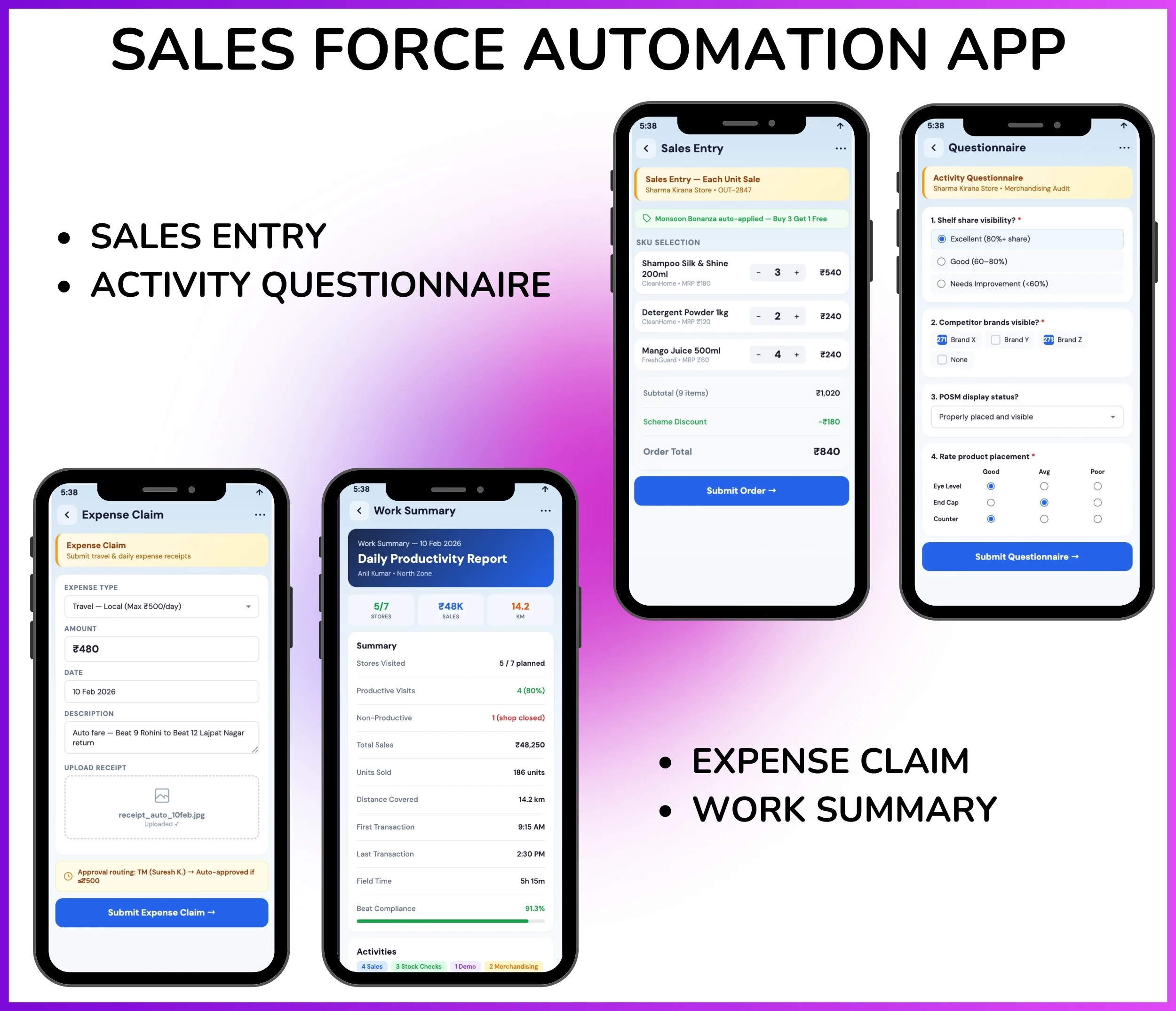
Field teams capture sales data during store visits via mobile app—"Each Unit Sale, Summary Sale, Demo, Secondary Sale, Stock" dimensions available—with SKU-wise quantity and value tracking, MTD Tertiary Sales report shows "detailed report on team's tertiary value sales till date by Date and SKU," distributor stock-in workflows track inventory movement, and sales targets configured per user/territory/product with achievement tracking for performance monitoring.
Sales Data Capture Types:
- Each Unit Sale: Capture SKU-wise tertiary sales at retail stores—field promoter enters product, quantity sold, and value during store visit for daily sales tracking
- Summary Sale: Enter aggregated sales data when SKU-wise entry not feasible—total sales value per store for quick data collection
- Secondary Sales: Track distributor-to-retailer sales—captures which products and quantities moved from distributor stock to retail outlets
- Stock Recording: Check current stock levels at retail stores or distributor warehouses—inventory snapshot for availability monitoring
- Demo/Sampling: Record product demonstrations and free samples distributed during store visits—tracks promotional activity effectiveness
- Order Capture: Take new orders from retailers via mobile app with SKU picker, quantity, and delivery date—replaces paper order books
Sales Analytics & Target Tracking:
- MTD Tertiary Sales Report: Analytics → Report Catalog shows "detailed report on team's tertiary value sales till date by Date and SKU"—eliminates manual Excel consolidation
- Sales Productivity Report (Unit/Value): Tracks "sales per visit, sales per employee, sales per territory" with unit and value metrics for performance comparison
- Target vs Achievement: Set monthly/quarterly sales targets per user/territory/product from Settings → Sales Targets; Advanced Dashboard shows target achievement percentage
- Distributor Stock-In: Track stock movements from company to distributor warehouses—primary sales data for complete supply chain visibility
- Order Fulfillment Tracking: Monitor order status from capture → dispatch → delivery with timeline view for customer service
- Sales Trend Analysis: Historical sales data with date range filters, SKU-wise trends, territory comparison, and growth percentage calculations
Note: Real-time sales capture eliminates end-of-day data entry, MTD reports provide instant visibility, and target tracking drives focused field execution.
Visit Tracking & Activity Questionnaires
Field employees check into stores during visits with GPS + photo verification, complete activity questionnaires configured via Market Working → Questionnaire Management with multi-type questions (radio buttons, checkboxes, dropdowns, matrix, ranking)—"you can design whatever form you want to fill during the store visit"—capturing market intelligence on competition, pricing, shelf share, stock-outs, and merchandising for structured data collection replacing random observations.
Activity Questionnaire Configuration:
- Admin creates questionnaires from Market Working → Questionnaire Management → Create Activity with custom question types
- Radio Button Questions: Single-choice questions like "Is brand available? (Yes/No)" for simple yes/no data collection
- Checkbox Questions: Multi-select questions like "Select all competitors visible" with predefined brand list for shelf share tracking
- Dropdown Questions: Pick-list selections like "Store cleanliness rating" with options (Excellent/Good/Average/Poor) for standardized ratings
- Matrix Questions: Grid format for multiple attributes across products—e.g., rows=SKUs, columns=availability/facing/price for efficient data entry
- Ranking Questions: Order items by preference—"Rank top 3 competitor brands by visibility" for competitive intelligence
- Mandatory vs Optional: Mark critical questions as mandatory preventing visit completion without answers; optional for non-critical data
Visit Productivity & Quality Checks:
- Visit Reports: Analytics → Report Catalog → Visit Reports shows "daily count of stores visited by each field employee" with GPS coordinates and timestamps
- Activity Completion Tracking: Track which questionnaires completed per visit—identifies skipped activities for quality assurance
- Visit Duration Analytics: Calculate average time spent per store visit, identify outliers (too quick=insufficient work, too long=inefficiency)
- GPS-Photo Verification: Every store check-in captures GPS location + store front photo ensuring visit authenticity—prevents fake visits
- Activity Quality Checks: Market Working → Activity Quality Checks enables manager approval workflows for sensitive questionnaires requiring validation before analytics
- Questionnaire Response Reports: Export activity responses in Excel for detailed analysis—e.g., aggregated stock-out percentages, average ratings by territory
Note: Structured questionnaires replace subjective observations with quantified market intelligence enabling data-driven decision making on merchandising, competition, and promotional effectiveness.
Analytics & Reporting (Comprehensive Pre-Built Reports)
Comprehensive analytics via Analytics module with pre-built reports covering all field operations, plus custom Report Builder for ad-hoc analysis and configurable dashboards for at-a-glance metrics.
- 40+ Pre-Built Reports: Attendance Summary, MTD Tertiary Sales, Sales Productivity (Unit/Value), Visit Reports, Beat Compliance, Stock Reports, Order Reports, and Activity Response Reports
- Custom Report Builder: Drag-drop interface to create ad-hoc reports from extensive field library across all modules
- Dimension Grouping: Analyze by user, territory, date, product category, store type for multi-dimensional insights
- Excel/CSV Exports: All reports downloadable for offline analysis or integration with Tableau/Power BI
- Scheduled Reports: Configure automated daily/weekly/monthly report generation with email delivery to stakeholders
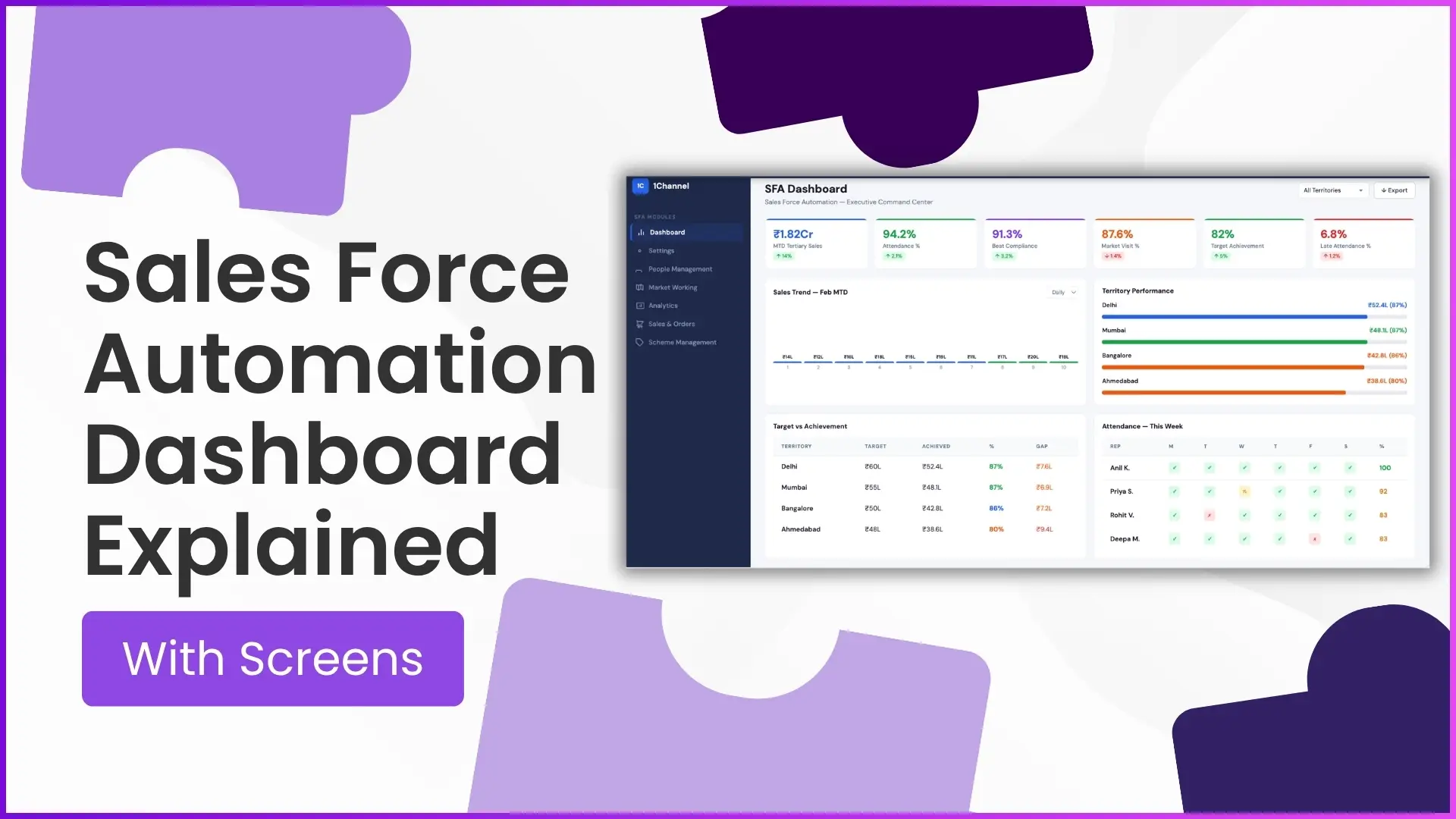
- Advanced Dashboard: Configurable KPI tiles showing real-time metrics like MTD sales, attendance percentage, beat compliance
People Management (Leave & Expense Workflows)
Complete HR workflows via People Management module—automated leave management with configurable policies, expense claim processing with receipt uploads, and attendance regularization—all with approval routing via organization hierarchy.
- Configurable Leave Policies: Define earned leave, casual leave, and holiday calendars fully customizable per organization (e.g., 1.5 earned leaves/month)
- Automatic Leave Allocation: System auto-credits configured leave balances monthly without manual HR intervention
- Mobile Leave Application: Employees apply for leave via mobile app with instant submission and approval routing to reporting head
- Expense Claims: Field teams submit expense claims with receipt photo/PDF uploads via mobile app
- Automated Approval Workflows: All leave and expense requests route automatically to managers based on organization hierarchy
- Attendance Closure: Lock monthly attendance data for payroll integration with accurate present/absent/leave records
Key Features & Benefits
AI-Powered Attendance Tracking
Beat Plan Compliance Management
User & Organization Hierarchy
Store Master Data Management
Product Catalog & Pricing
Primary/Secondary/Tertiary Sales
Visit Tracking & Questionnaires
40+ Pre-Built Analytics Reports
Leave & Expense Management
Scheme & Campaign Management
Mobile App with Offline Mode
Enterprise-Grade Scalability & Support
Who Uses 1Channel Sales Force Automation Software?
Comprehensive field sales automation platform serving diverse industries managing distributed sales teams—FMCG companies tracking primary/secondary/tertiary sales, pharma firms managing medical representative visits, manufacturing companies with channel sales networks, retail brands executing in-store merchandising campaigns, and service organizations coordinating field operations across territories.
FMCG & CPG Companies
Track primary/secondary/tertiary sales across distributor networks, manage beat plans for promoter visits to retail stores, capture stock and availability data, execute trade promotional schemes, and generate MTD sales reports by SKU/territory for sales performance monitoring.
Pharmaceutical Companies
Manage medical representative (MR) visits to doctors/hospitals/chemists with AI attendance validation, track doctor call frequency and compliance, capture sample distribution and product demonstrations, generate visit productivity reports, and ensure regulatory compliance with GPS/photo verification.
Manufacturing & Industrial Products
Automate channel sales management with distributor/dealer networks, track orders and inventory across stockists, manage scheme-based incentives for dealers, capture visit feedback via activity questionnaires, and generate channel sales analytics for decision-making.
Retail & Consumer Durables
Execute retail merchandising campaigns with POSM deployment tracking, conduct store audits via structured questionnaires, monitor competition activity and pricing, track brand visibility and shelf share, and generate store-wise performance reports for retail execution.
Banking & Financial Services
Manage business development officer (BDO) field operations with attendance tracking, coordinate client visits with appointment scheduling, capture lead information and loan applications, track application status through approval workflows, and generate sales funnel analytics for portfolio management.
Healthcare & Diagnostics
Coordinate field sales teams for hospital/clinic/pathology partnerships, manage sample collection executive beat plans, track test bookings and collection schedules, capture doctor feedback via structured forms, and generate territory-wise performance metrics for growth planning.
Agro & Seeds Companies
Automate field officer visits to farmers/dealers/distributors, manage seasonal product demonstrations and trials, track order booking during sowing seasons, capture farmer feedback and soil data, and generate crop-wise/region-wise sales analytics for demand forecasting.
Service & Installation Businesses
Coordinate technician/engineer field operations with job scheduling, manage service visit tracking with customer signatures, capture pre/post-installation photos for verification, track spare parts inventory and consumption, and generate service completion reports for billing and customer satisfaction.
PRICING
Yearly Plan
Other 1Channel Solutions for Sales Teams
Customer Relationship Management Software
Manage customer relationships, track interactions, and automate sales pipelines.
Loyalty Management Software
Channel partner and influencer loyalty programs with rewards and points redemption.
Retail Merchandising Software
Merchandising, shelf audits, planogram compliance, and retail visibility tracking.
LMS for Sales Teams
Training, onboarding, certification, and knowledge assessments for field teams.
Sales Analytics Software
Real-time dashboards, performance analytics, and predictive insights for sales teams.
Store & Outlet Management
Store master data, outlet tracking, beat mapping, and retail location management.
Leave Management Software
Leave requests, approvals, balance tracking, and automated leave policy management.
HR Management Software
Employee database, payroll integration, performance reviews, and HR policy automation.
Expense Management Software
Expense claims, receipt uploads, and automated reimbursement workflows.
Field Activity Management Software
Track field visits, activities, GPS verification, and real-time location monitoring.
Sales Scheme Management Software
Promotional schemes, incentives, discounts, and trade marketing campaigns.
Workforce Management Software
Beat planning, attendance closure, claim approvals, and team hierarchy management.
Attendance & Time Tracking Software
AI face recognition, GPS verification, and real-time attendance tracking for field teams.
Route Planning Software
Beat plan creation, GPS-validated route compliance, and visit scheduling for field sales teams.
Distributor Management Software
Distributor onboarding, store mapping, secondary sales tracking, and channel analytics.
Customers Speak
With 1Channel, we've achieved 100% digitisation in sales team movement, order management, and inventory visibility, transforming the way we operate. The most beautiful thing about 1Channel is its ability to be completely customised to meet our organisation's unique requirements.

1Channel is one of the best CRM software for field teams. It helps us collect data from over 100 field salespeople across the Gulf region and send instant analytical reports. When we walk into the office in the morning, the automatic sales reports are already waiting in our mailbox.

Thanks to 1Channel SFA tool, we have managed to automate our manual sales process across Asia and Australia into a mobility-based solution, with details of every account over the cloud. Key account managers can see results, any time, across the region.

1Channel SFA tool has made a huge impact on our sales reports, making it easy to track number of customer visits with realistic numbers. The support has been excellent. I am glad to be working with the right partner who understands our requirements.

Before 1Channel CRM software, we evaluated many sales CRM apps and choose them over the others for the innumerable configuration options that meet our business requirements. It is now very easy for us to manage field sales operations in a simple click.

Rewards and Recognition
Our recognitions constantly motivate us to push the envelope of excellence and empower our customers with winning ideas each day.




Celebrating Growth Milestones on Play Store, App Store, & G2






Ratings as of January 2025. Visit respective platforms for current reviews.