Trusted By Leading Organizations
Why Choose 1Channel Expense Management Software in India?
What is Expense Management Software?
Expense management system that handles expense head definitions, claim policy configuration, mobile claim submission with receipt uploads, approval workflows based on reporting hierarchy, and automated reimbursement processing—replacing manual expense tracking and email-based approvals.
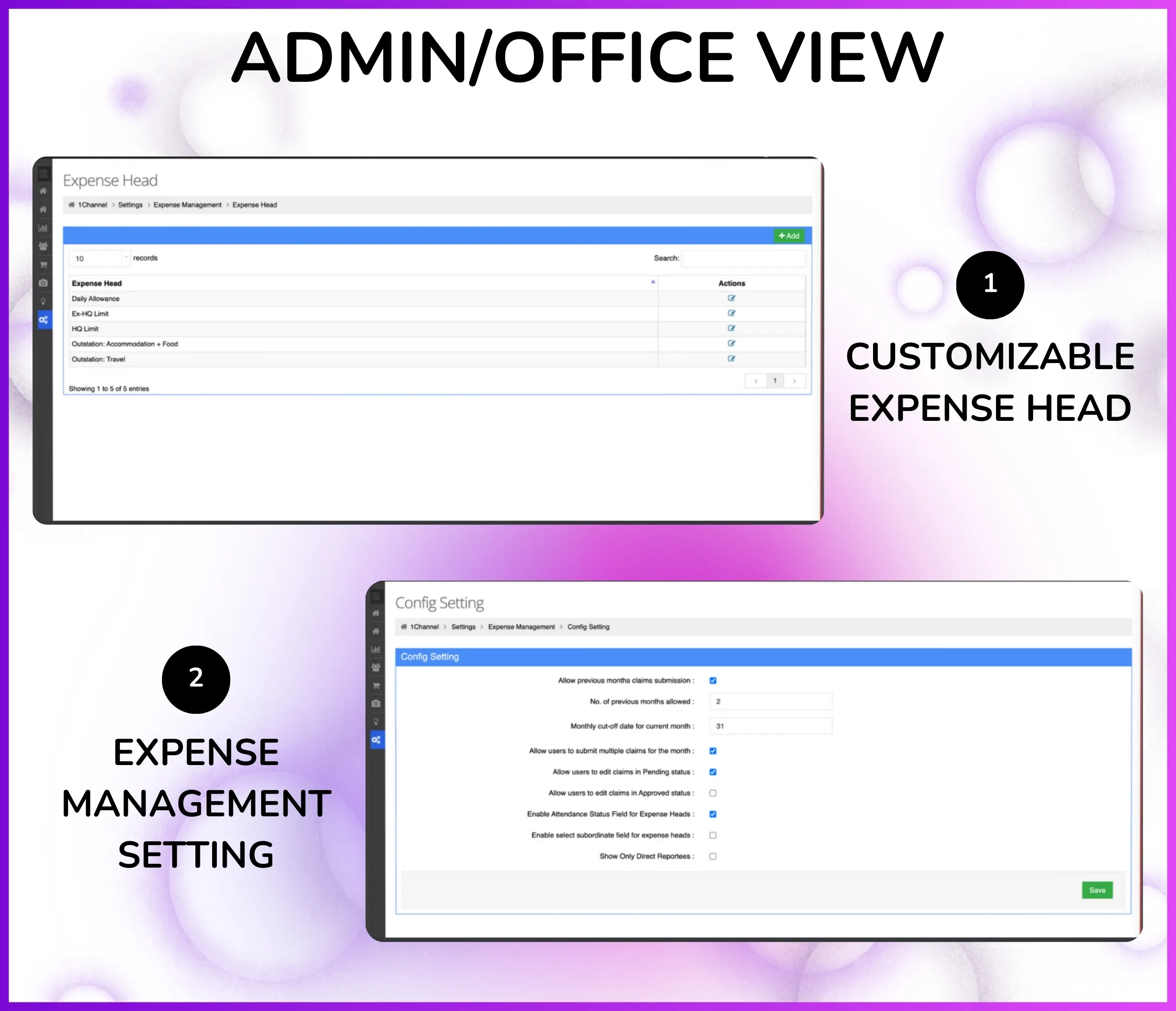
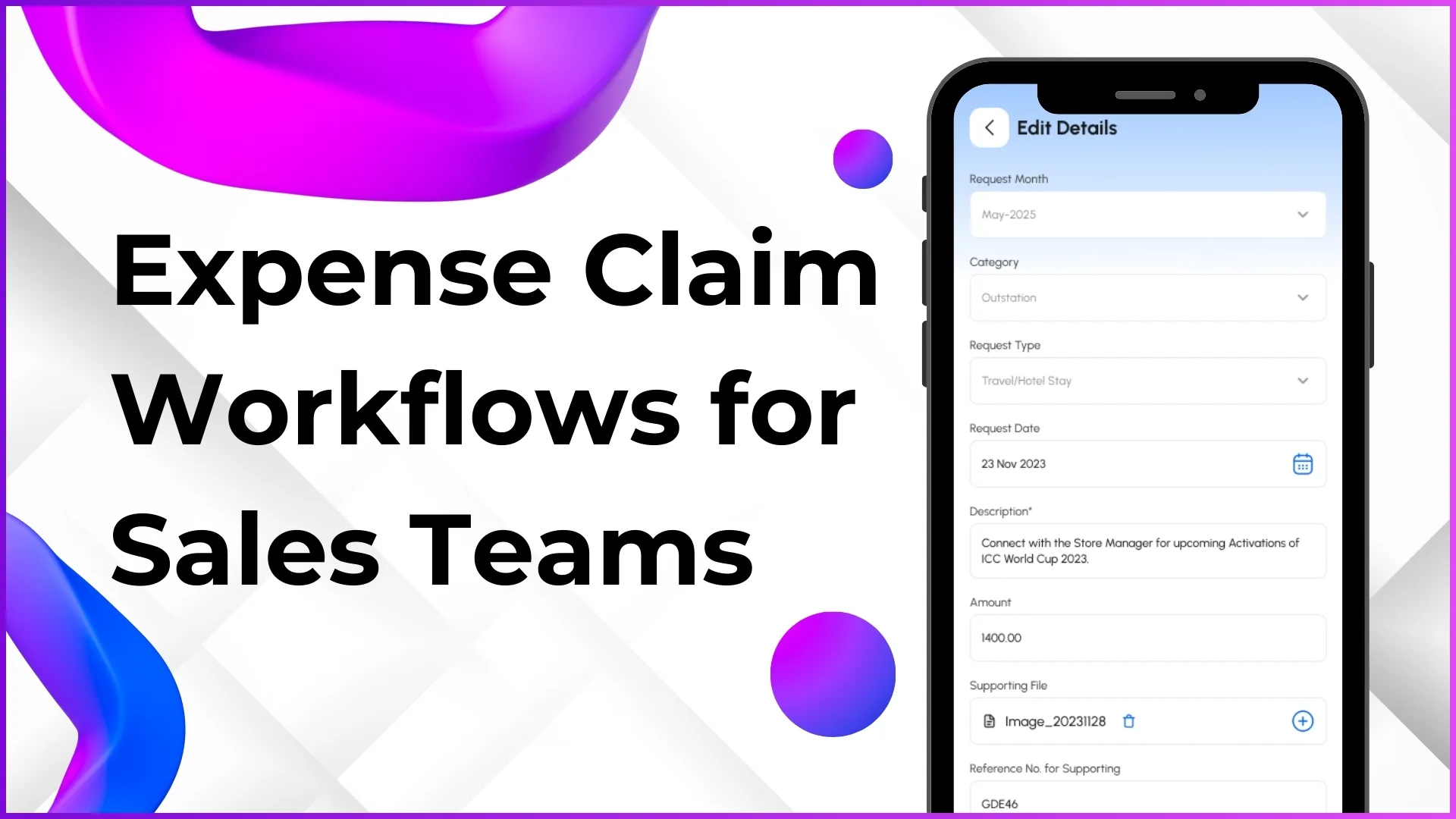
From Settings → Expense Management, admins configure Expense Head categories and Manage Claim Policies. Employees submit claims from mobile app ("You can apply for claim from our application") with Request Code, Request Month, Request Date, Requestor details, and Requested Amount. Claims route to reporting heads for approval via People Management → Approve Claims screen.
What It Does:
- Defines custom expense heads (Travel, Fuel, Meals, Accommodation, Communication, Client Entertainment, Daily Allowance)
- Configures claim policies with expense limits, approval rules, and reimbursement settings per expense head
- Captures mobile expense submissions with Request Code, Month, Date, Requestor, Role, and Requested Amount
- Uploads receipts, bills, and invoices via Document Management for claim verification
- Routes claims to reporting heads automatically based on Organization Tree hierarchy
- Approves/rejects claims from portal ("claim will come for approval in this particular screen")
- Processes reimbursement automatically once approver approves ("Reimbursement exactly reimbursement")
- Downloads expense reports from Report Catalog showing expense breakdown by head, employee, and period
Eliminates manual expense tracking — replaces paper receipts, Excel sheets, and email follow-ups with automated claim management workflows.
Why Expense Management Software is Essential?
Centralized expense management ensures accurate expense tracking, automates claim submission and approval workflows, eliminates receipt loss, streamlines reimbursement processing, and integrates with payroll systems for field sales teams.
1. Stop Expense Tracking Errors
- Single source of truth for all employee expense claims with Request Code tracking
- 100% accurate expense records showing Request Month, Date, Requestor, Role, and Requested Amount
- Eliminates manual Excel tracking and paper receipt management
- Real-time expense status updates in mobile app after approval/rejection
2. Eliminate Receipt Loss & Verification Issues
- Digital receipt uploads via Document Management—attach bills, invoices, and receipts directly to claims
- No more lost paper receipts or delayed claim submissions
- Approvers verify expenses with attached receipts in approval screen
- Complete audit trail with receipts stored permanently for compliance
3. Streamline Approval Workflows
- Claims automatically route to reporting heads based on Organization Tree hierarchy
- "Claim will come for approval in this particular screen" (People Management → Approve Claims)
- Manager approves/rejects with one click from portal
- Employee gets real-time reimbursement status updates in mobile app
4. Automate Reimbursement Processing
- "Reimbursement exactly reimbursement"—once approver approves, reimbursement processed automatically
- No manual follow-ups or payment tracking needed
- Configurable reimbursement rules per expense head via Manage Claim Policies
- Prevents reimbursement delays and employee frustration
5. Integrate with Payroll
- Approved expense data syncs with Attendance Closure system—"useful for payroll" processing
- Download expense reports from Report Catalog in Excel/CSV format
- Accurate reimbursement calculation for salary disbursement
- Expense breakdown by employee for payroll reconciliation
6. Enforce Expense Policies
- Configure claim policies per expense head (Settings → Expense Management → Manage Claim Policies)
- Set expense limits, approval requirements, and reimbursement rules based on company policy
- System validates claims against policies before submission
- Prevents policy violations and ensures compliance across field teams
How Our Expense Management Software Works
Complete expense management system with expense head configuration, claim policy setup, mobile claim submission, receipt uploads, approval workflows, and automated reimbursement processing from portal and mobile app.
- Define Expense Heads & Claim Policies
- Submit Claims from Mobile App
- Upload Receipts & DocumentsManager Approval DashboardAutomated Reimbursement Processing
Define Expense Heads
Admin creates custom expense categories from Settings → Expense Management → Expense Head where expenses are classified. "You can create an expense head, OK where your expense went"—defines categories for travel, fuel, meals, accommodation, and other business expenses.
How It Works:
- Admin goes to Settings → Expense Management → Expense Head
- Creates expense head with name (e.g., "Travel Expense", "Fuel & Vehicle", "Client Entertainment")
- Defines expense category code for reporting and tracking purposes
- Sets whether expense head requires receipt upload (mandatory/optional)
- Configures approval requirements and reimbursement rules per expense head
- Expense heads become available in mobile app for employees to select when submitting claims
Common Expense Heads for Field Sales Teams:
- Travel Expense — "work related trip sponsored by the company" including train, flight, bus fares for client visits and field work
- Fuel & Vehicle — fuel costs, vehicle maintenance, toll charges for employees using own vehicles for business travel
- Accommodation — hotel stays during outstation field visits, lodging expenses for sales meetings and events
- Meals & Food — daily food allowance during field visits, client meal expenses during business meetings
- Client Entertainment — expenses for client meetings, business dinners, and relationship building activities
- Communication — mobile recharge, internet data charges for field employees staying connected with office and clients
- Daily Allowance (Per Diem) — fixed daily allowance for outstation duty covering miscellaneous expenses
- Miscellaneous — other business-related expenses not covered by standard categories
Note: Expense head definitions fully configurable per organization's expense policy and business requirements. From Settings, admin creates expense heads aligned with company's reimbursement structure.
Configure Claim Policies
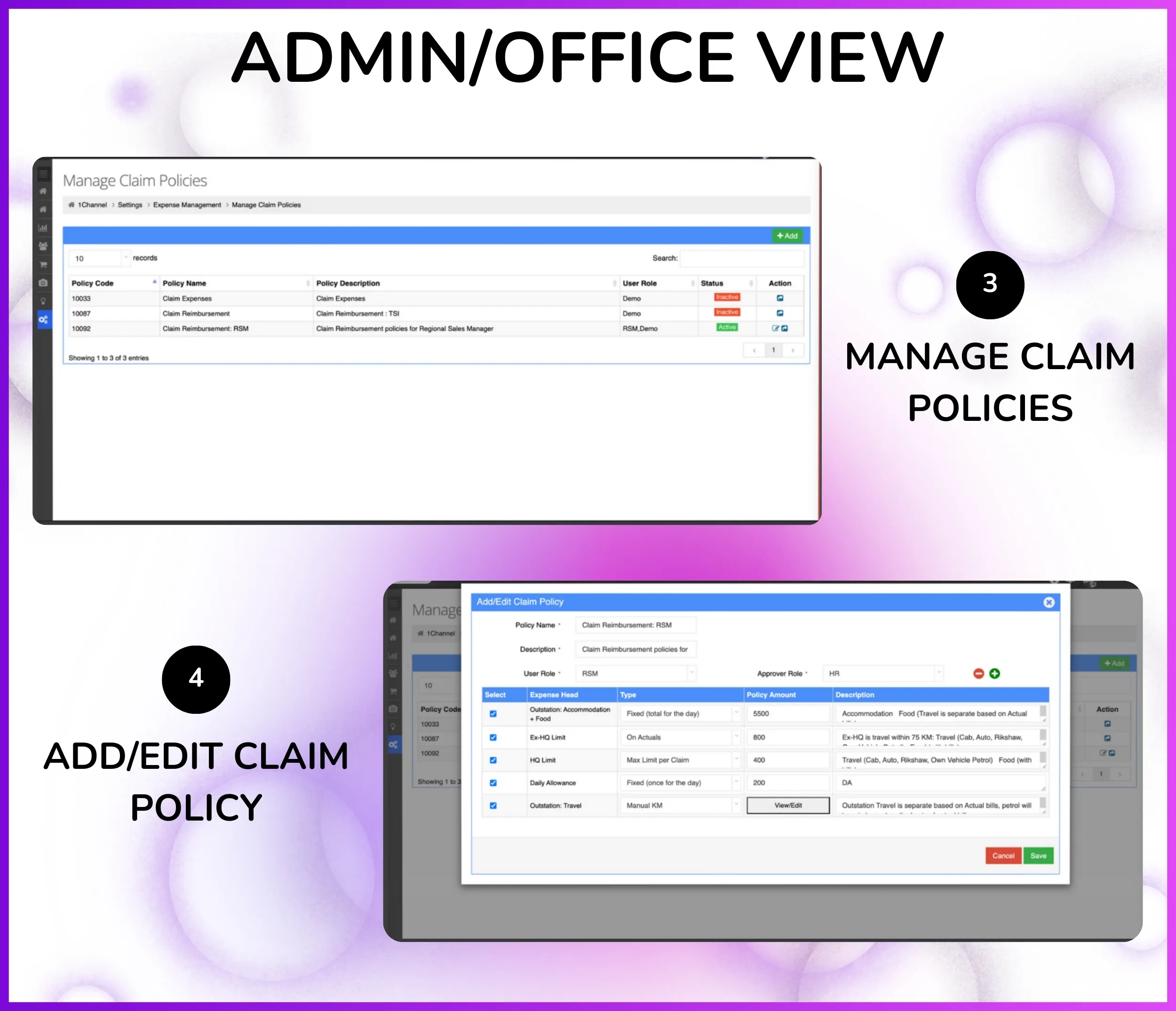
From Settings → Expense Management → Manage Claim Policies, admin configures expense limits, approval requirements, and reimbursement rules per expense head based on company policy—ensuring policy compliance before claim submission.
Configure Policy Rules:
- Go to Settings → Expense Management → Manage Claim Policies
- Select expense head (e.g., "Travel Expense", "Fuel & Vehicle", "Daily Allowance")
- Set maximum claim amount per transaction (e.g., Travel: ₹5000, Fuel: ₹2000, Meals: ₹500)
- Configure monthly or weekly expense limits per employee per expense head
- Define approval requirements: single-level (reporting head) or multi-level (reporting head + department head)
- Set receipt upload requirement: mandatory for amounts above threshold or optional
Policy Examples for Field Teams:
- Travel Policy: Max ₹5000 per trip, receipt mandatory above ₹500, reporting head approval required
- Fuel Policy: Max ₹2000 per week, fuel bill upload mandatory, auto-approved if within limit
- Daily Allowance: Fixed ₹300/day for outstation duty, no receipt required, auto-approved based on duty dates
- Client Entertainment: Max ₹3000 per meeting, restaurant bill mandatory, requires reporting head + manager approval
- Communication: Max ₹500/month for mobile recharge, recharge receipt required, reporting head approval
Note: Claim policies validated at submission time—system prevents claims exceeding configured limits and enforces receipt upload requirements based on policy rules.
Mobile Claim Submission
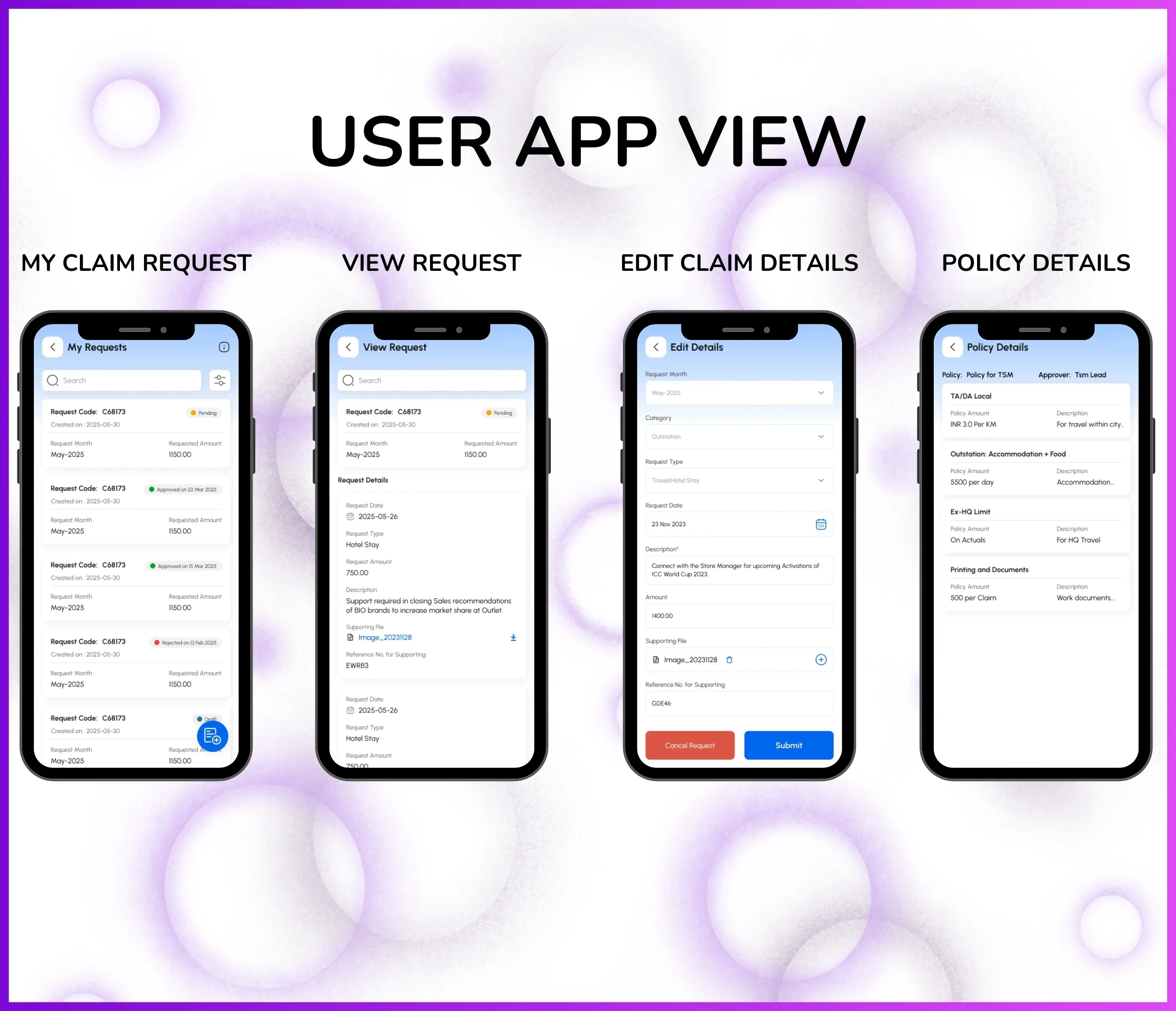
"You can apply for claim from our application"—field employees submit expense claims directly from mobile app with Request Code, Request Month, Request Date, Requestor details, Role, Requested Amount, and expense head selection for immediate reimbursement processing.
How Mobile Submission Works:
- Employee opens 1Channel mobile app and navigates to Expense Management section
- Selects "Submit New Claim" and system auto-generates unique Request Code for tracking
- Fills claim details: Request Month, Request Date, expense head (Travel/Fuel/Meals/etc.)
- Enters Requested Amount and expense description (e.g., "Client visit to Mumbai - train fare")
- System validates against configured claim policy limits before submission
- Claim submitted with all details: Request Code, Requestor name, Role, Amount, and Actionable status
Mobile App Features for Field Teams:
- Instant claim submission — submit expenses immediately after incurring them, no waiting to reach office
- Offline capability — draft claims offline during field visits, auto-sync when internet available
- Request Code tracking — unique code generated per claim for easy tracking and reference
- Real-time status updates — see claim status (Pending/Approved/Rejected) instantly in app
- Claim history — view all submitted claims with Request Month, Date, Amount, and approval status
- Policy compliance alerts — app shows expense limits before submission to prevent policy violations
Note: Mobile claim submission captures Request Code, Request Month, Request Date, Requestor, Role, and Requested Amount as per People Management → Approve Claims screen requirements.
Receipt & Document Upload
Attach bills, invoices, and receipts directly to expense claims using Document Management system—"you want certain files or PDFs to be present" for verification, audit trail, and compliance. Eliminates lost paper receipts and provides complete expense documentation.
How Document Upload Works:
- Employee submits claim from mobile app with Request Code and expense details
- Clicks "Attach Receipt" and selects document from phone camera or gallery
- System uploads receipt to Document Management system linked to claim Request Code
- Supported formats: JPG, PNG, PDF (bills, invoices, fuel receipts, hotel bills, restaurant bills)
- Multiple receipts can be attached per claim for itemized expense verification
- Receipt thumbnails visible in approval screen for approver verification
Document Management Benefits:
- Eliminate lost receipts — no more lost paper bills or delayed claims due to missing documentation
- Instant verification — approvers verify expenses with attached receipts in People Management → Approve Claims screen
- Audit trail — all receipts stored permanently with claim history for tax audits and compliance checks
- Policy enforcement — mandatory receipt upload for expenses above configured threshold (e.g., ₹500)
- OCR capability — system can extract amount and vendor details from receipt images (optional feature)
- Cloud storage — centralized document repository accessible from portal and mobile app
Note: Receipt upload requirements configurable per expense head via Manage Claim Policies—can be mandatory, optional, or required above specific amount threshold.
Hierarchical Approval Workflow
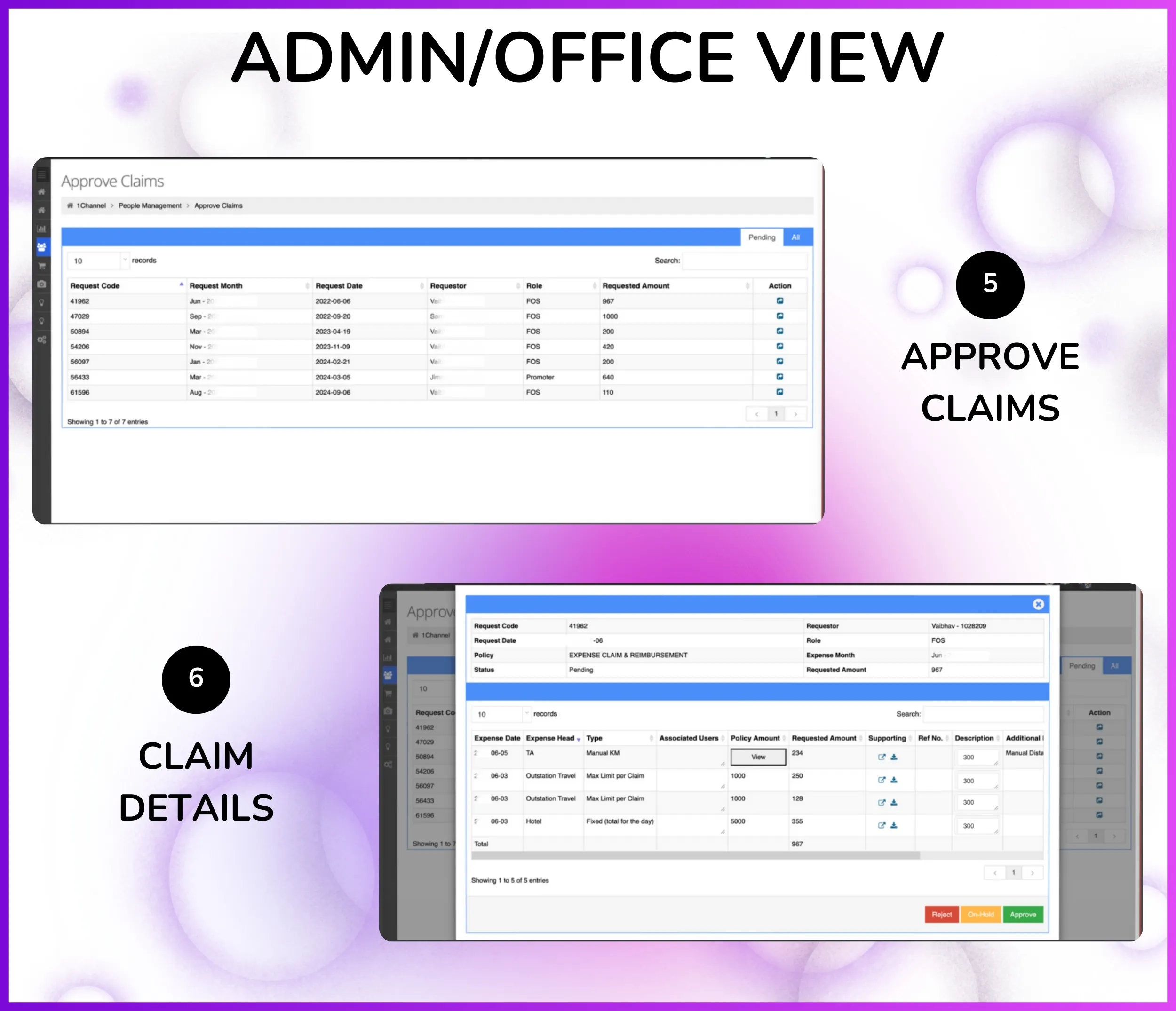
"Claim will come for approval in this particular screen"—expense claims automatically route to reporting heads based on Organization Tree hierarchy via People Management → Approve Claims with complete visibility of Request Code, Month, Date, Requestor, Role, and Requested Amount.
How Approval Routing Works:
- Employee submits expense claim from mobile app with Request Code auto-generated
- System reads Organization Tree hierarchy: "hierarchy will be visible in this screen"
- Example: Field Executive (Ayush) → Team Leader (Ravi) → Area Manager (Priya) → Regional Head (Amit)
- "It will go for approval to reporting head"—claim routes to Ravi (Ayush's immediate reporting head)
- Ravi logs into portal → People Management → Approve Claims
- Sees pending claim: Request Code, Request Month, Request Date, Requestor (Ayush), Role (Field Executive), Requested Amount, Action buttons
Manager Approval Dashboard Features:
- Claim details view — see Request Code, Month, Date, Requestor name, employee Role, and Requested Amount
- Receipt verification — view attached receipts/bills from Document Management directly in approval screen
- Policy compliance check — system highlights claims exceeding policy limits for review
- One-click approval — click "Approve" or "Reject" with optional comments for employee feedback
- Multi-level approval — for high-value claims, approval required from both reporting head and department head
- Bulk actions — approve multiple claims at once for faster processing
- Real-time notifications — employee gets instant status update in mobile app after approval/rejection
Note: Approval workflow follows Organization Tree hierarchy automatically—claims visible only to designated reporting heads based on org structure.
Automated Reimbursement Processing
"Reimbursement exactly reimbursement"—once approver approves the expense claim, reimbursement amount processed automatically without manual follow-ups, payment tracking, or delays. System handles complete reimbursement workflow from approval to disbursement.
How Automated Reimbursement Works:
- Manager approves claim from People Management → Approve Claims screen
- Approved claim moves to reimbursement queue automatically with Request Code and Requested Amount
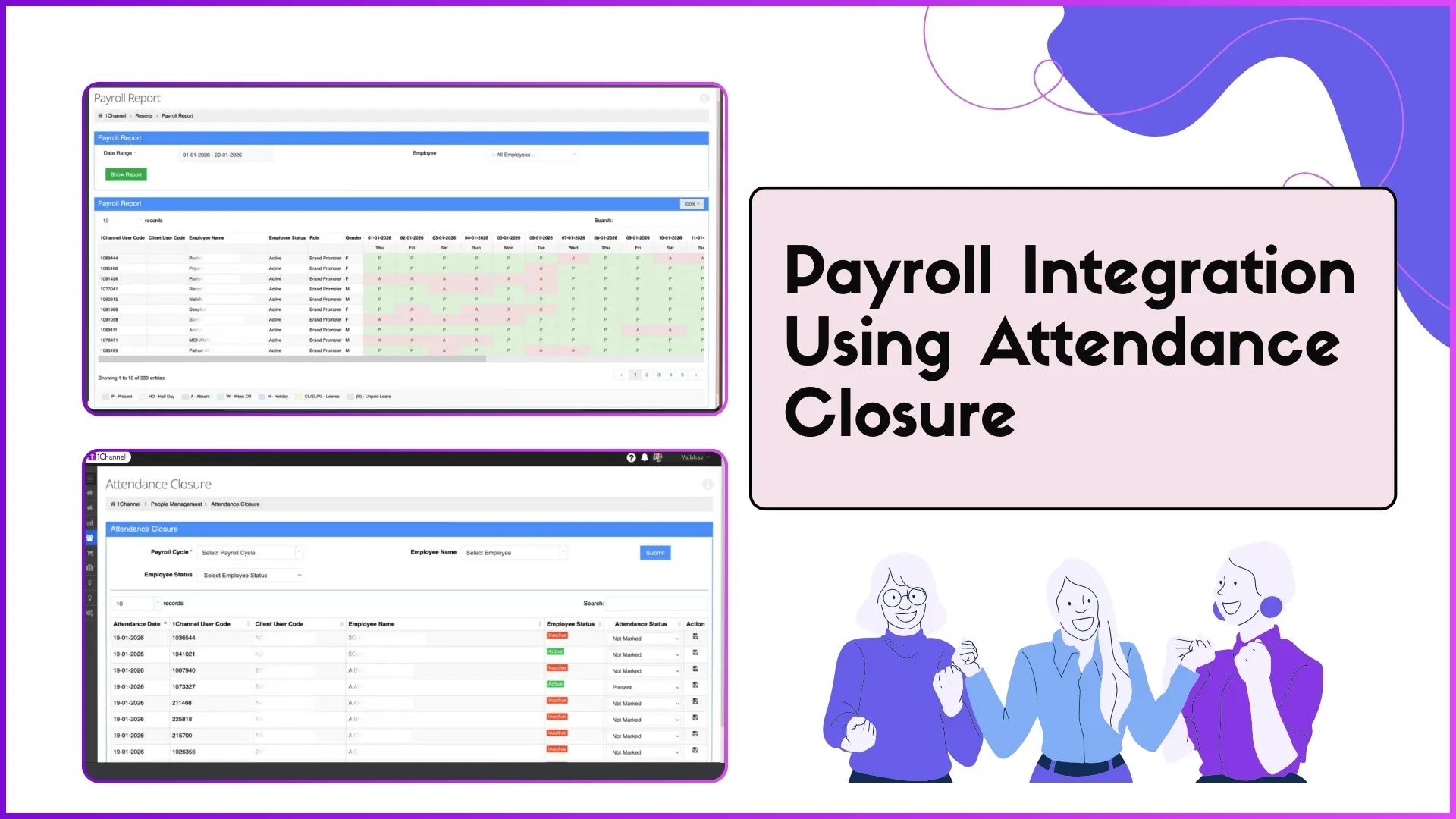
- System syncs with Attendance Closure system—"useful for payroll" salary processing
- Finance team sees approved reimbursements ready for disbursement with employee bank details
- Reimbursement processed in next payroll cycle or immediate bank transfer based on policy
- Employee sees reimbursement status ("Approved → Processing → Disbursed") in mobile app
Reimbursement Processing Features:
- Zero manual intervention — no follow-up emails or payment tracking needed after approval
- Payroll integration — syncs with Attendance Closure for salary calculation and disbursement
- Configurable disbursement — process in monthly payroll or immediate transfer per expense head policy
- Bank account linkage — employee bank details from profile auto-populated for direct transfer
- Reimbursement tracking — complete audit trail from claim submission → approval → disbursement with timestamps
- Tax compliance — system marks taxable vs non-taxable reimbursements for Form 16 reporting
- Bulk processing — process multiple approved claims together for efficiency
Note: Reimbursement rules configurable per expense head via Manage Claim Policies—can be processed in next payroll cycle or immediate bank transfer based on company policy.
Expense Reports & Analytics
"Get detailed reports... download in excel file"—comprehensive expense analytics from Report Catalog showing expense breakdown by head, employee, department, time period, and location with Excel/CSV export for analysis and reconciliation.
Available Expense Reports:
- Expense Summary Report — total expenses by employee with Request Count, Total Requested Amount, Approved Amount, Pending Amount
- Expense Head Breakdown — expenses grouped by head (Travel: ₹2.5L, Fuel: ₹1.2L, Meals: ₹80K) for budget tracking
- Department-wise Expenses — expense comparison across Sales, Marketing, Operations departments for cost center allocation
- Time Period Analysis — monthly/quarterly/annual expense trends showing Request Month patterns and seasonal variations
- Employee Expense History — complete claim history per employee with Request Code, Date, Amount, Status, Approval timeline
- Pending Approvals Report — all pending claims with Requestor, Request Date, Requested Amount, approver name
- Reimbursement Status — claims in different stages (Submitted → Approved → Processing → Disbursed) with timestamps
Report Builder & Export Features:
- Custom report builder — select columns (Request Code, Requestor, Role, Month, Date, Amount, Status, Expense Head)
- Advanced filters — filter by date range, expense head, department, approval status, amount range
- Excel/CSV export — download reports in Excel format for offline analysis and sharing with finance team
- Scheduled reports — auto-generate and email monthly expense reports to management
- Visual dashboards — charts showing expense trends, top expense heads, highest spenders, approval velocity
- Budget tracking — compare actual expenses vs budgeted amounts per expense head with variance analysis
- Policy violation alerts — flag claims exceeding policy limits or missing receipts for review
Note: All expense reports accessible from Report Catalog with real-time data refresh and Excel download capability for financial analysis and audit compliance.
Who Uses Expense Management Software in India?
Perfect for organizations managing field employee expenses across industries requiring mobile claim submission, receipt uploads, approval workflows, and automated reimbursement processing.
- Field Sales Teams – Expense management for 25,000+ distributed promoters with travel, fuel, daily allowance claims and hierarchical approvals
- Retail Chain Operations – Multi-store expense tracking for 5,000+ outlet managers with client entertainment, communication, and accommodation claims
- FMCG & CPG Companies – Territory-wise expense claims for sales teams with "work related trip sponsored by the company" reimbursements
- Pharmaceutical Sales – Doctor visit expenses, sample distribution costs, and conference travel claims with receipt verification
- Real Estate Brokers – Site visit expenses, client meeting costs, and vehicle maintenance claims with payroll integration
- Logistics & Distribution – Driver fuel expenses, vehicle toll charges, and loading/unloading costs with bulk reimbursement processing
- Service & Installation Teams – On-site service expenses, spare parts procurement, and transportation claims with instant mobile submission
- Insurance Agents – Field visit expenses, client meeting costs, and marketing material expenses with policy-based approval workflows
Other 1Channel Solutions for Sales Teams
Sales Force Automation Software
Complete field sales management with order booking, distributor management, and beat planning.
CRM Software
Manage customer relationships, track interactions, and automate sales pipelines.
Loyalty Management Software
Channel partner and influencer loyalty programs with rewards and points redemption.
Retail Execution Software
Merchandising, shelf audits, planogram compliance, and retail visibility tracking.
LMS for Sales Teams
Training, onboarding, certification, and knowledge assessments for field teams.
Workforce Management Software
Beat planning, attendance closure, leave management, and claim approvals for distributed teams.
Sales Analytics & Reporting
Real-time dashboards, custom reports, and business intelligence for sales teams.
Store & Outlet Management
Outlet database, visit tracking, and store-level performance monitoring.
Leave Management Software
Leave requests, approvals, regularization workflows, and auto-allocation for field teams.
HR Management Software
Employee data management, role assignments, organization hierarchy, and HR compliance.
Field Activity & Questionnaire
Custom forms, surveys, audits, and field data collection tools.
Sales Scheme Management Software
Promotional schemes, incentives, discounts, and trade marketing campaigns.
Attendance & Time Tracking Software
GPS attendance marking, photo validation, AI face recognition, and payroll integration.
Customers Speak
With 1Channel, we've achieved 100% digitisation in sales team movement, order management, and inventory visibility, transforming the way we operate. The most beautiful thing about 1Channel is its ability to be completely customised to meet our organisation's unique requirements.

Watch Video1Channel is one of the best CRM software for field teams. It helps us collect data from over 100 field salespeople across the Gulf region and send instant analytical reports. When we walk into the office in the morning, the automatic sales reports are already waiting in our mailbox.

Thanks to 1Channel SFA tool, we have managed to automate our manual sales process across Asia and Australia into a mobility-based solution, with details of every account over the cloud. Key account managers can see results, any time, across the region.

1Channel SFA tool has made a huge impact on our sales reports, making it easy to track number of customer visits with realistic numbers. The support has been excellent. I am glad to be working with the right partner who understands our requirements.

Before 1Channel CRM software, we evaluated many sales CRM apps and choose them over the others for the innumerable configuration options that meet our business requirements. It is now very easy for us to manage field sales operations in a simple click.

Rewards and Recognition
Our recognitions constantly motivate us to push the envelope of excellence and empower our customers with winning ideas each day.