Trusted By Leading Organizations
Why Choose 1Channel HR Management Software in India?
What is HR Management Software?
HR policy configuration platform that centralizes leave policy setup, expense head definitions, attendance rules, holiday calendars, approval workflows, organization structure, and employee data management—replacing scattered policy documents, manual configurations, and inconsistent HR rules.
HR admins configure all policies from portal: define leave types, set expense categories, create attendance rules, upload holiday calendars, build organization hierarchy, and establish approval workflows. Once configured, policies automatically apply to all employees with rule-based automation.
What It Does:
- Define leave types (earned, casual, sick) with auto-allocation rules and carry-forward policies
- Configure expense heads (travel, food, fuel) with reimbursement limits and approval thresholds
- Set attendance rules defining statuses (present, half-day, on-duty) and regularization remarks
- Upload holiday calendars for multiple regions and establish optional vs mandatory holidays
- Build organization hierarchy with reporting structure and role-based approval routing
- Create employee master data with user codes, location mapping, and attribute assignment
- Design multi-level approval workflows for leaves and expenses based on hierarchy
- Configure attendance closure settings for monthly payroll integration
Reduces HR policy setup time by 90% — eliminates manual policy documentation, scattered Excel configurations, and inconsistent rule application with centralized HR policy management.
Why HR Management Software is Essential?
Centralized HR policy platform ensures consistent leave rules, standardized expense policies, unified attendance configurations, and automated approval workflows—eliminating policy inconsistencies and manual HR configuration across distributed teams.
1. Accurate Payroll Integration
- Attendance closure syncs directly with payroll systems for accurate salary calculation
- 100% accurate payroll processing with attendance days, leave deductions, and expense reimbursements
- Eliminates manual attendance registers and Excel-based payroll errors
- Real-time payroll readiness tracking showing attendance closure status by employee/team
2. Automated Attendance & Leave Tracking
- GPS attendance tracking with photo validation and AI face recognition (2-second verification)
- No manual attendance registers or proxy punch-ins—AI verifies employee identity
- Auto-allocate leaves monthly per employee (allocation amount configurable per company policy)
- Real-time attendance dashboard showing present/absent/late status by employee/team/region
3. Streamlined Expense & Claim Management
- Employees submit expense claims with receipt photo/PDF uploads from mobile app
- Configurable expense categories: Travel, Food, Accommodation, Fuel, Client Entertainment
- Expense requests automatically route to reporting heads based on organization hierarchy
- Manager reviews claims with receipt proofs and approves/rejects from portal dashboard
4. Workforce Planning & Beat Management
- Field employees create daily/weekly beat plans with retailer/outlet visit schedules
- Route optimization suggests efficient visit sequencing to minimize travel time
- Manager approves beat plans and tracks execution via GPS in real-time
- Beat compliance reports show planned vs. actual visits with completion percentage
5. Organization Hierarchy & Role Management
- Create employees with roles: Promoter, Team Leader, Area Manager, Regional Manager, Admin
- Define reporting hierarchy: Who reports to whom across entire organization structure
- Visual org chart showing complete reporting tree with employee count at each level
- Hierarchy drives approval routing for leave, expenses, and beat plans automatically
6. Real-Time HR Analytics & Reports
- HR analytics dashboard with attendance trends, leave utilization, expense summaries, workforce productivity
- Download Excel reports: attendance sheets, leave balance, expense claims, beat plan compliance
- Filter reports by employee, team, department, region, branch, or date range
- Scheduled reports: auto-email weekly attendance summary or monthly HR metrics to management
How Our HR Management Software Works
Complete hr management system handling attendance tracking, leave management, expense claims, workforce planning, organization hierarchy, and HR analytics from admin portal and mobile app.
- Setup Attendance & Leave Policies
- Create Users & Organization Hierarchy
- Track Attendance with GPS & PhotoManage Leave & Expense ApplicationsView HR Analytics Dashboard
Attendance & Time Tracking
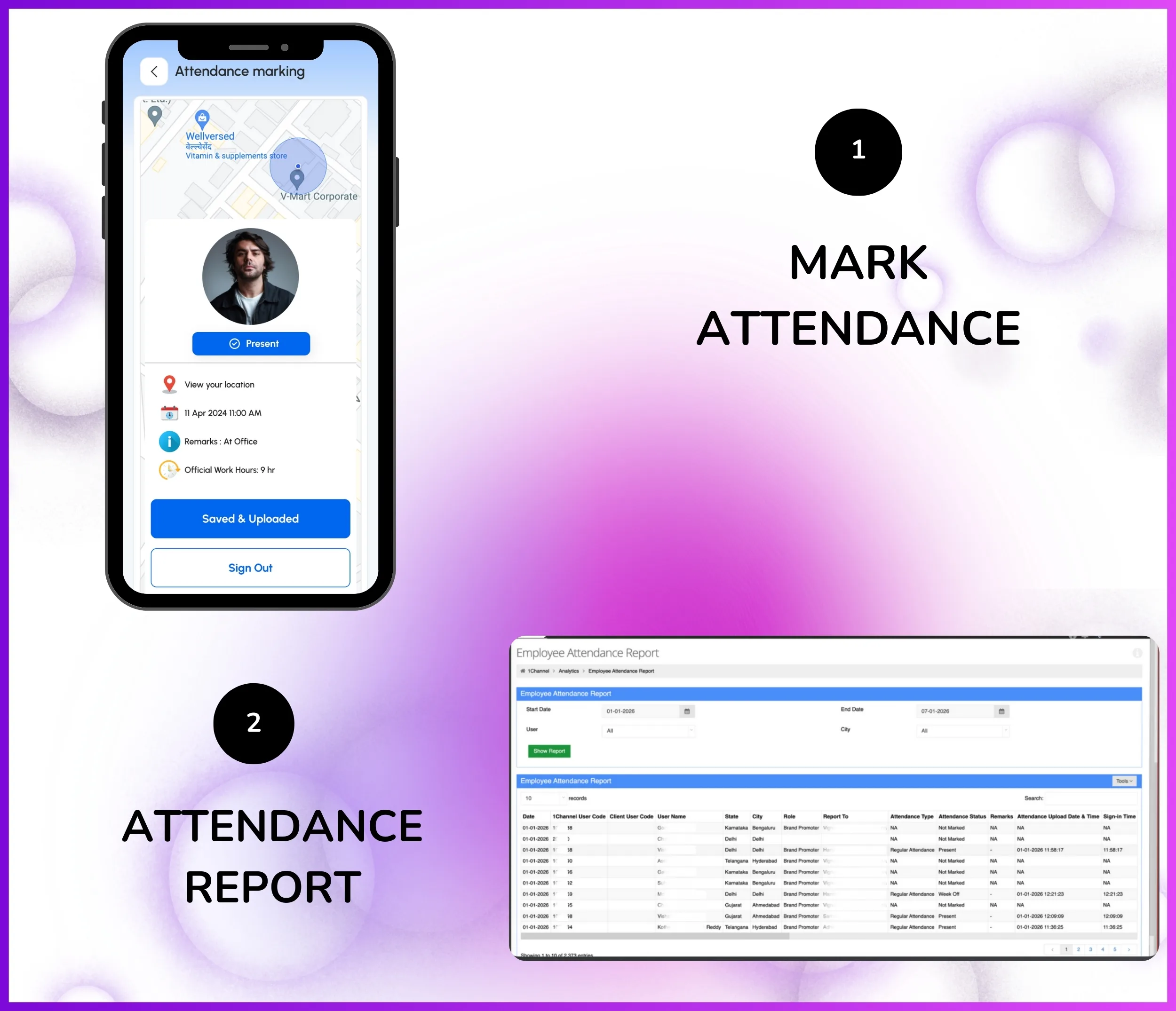
AI-powered attendance tracking with photo validation, GPS verification, and payroll closure eliminates proxy attendance and manual register maintenance for distributed field teams.
How Attendance Tracking Works:
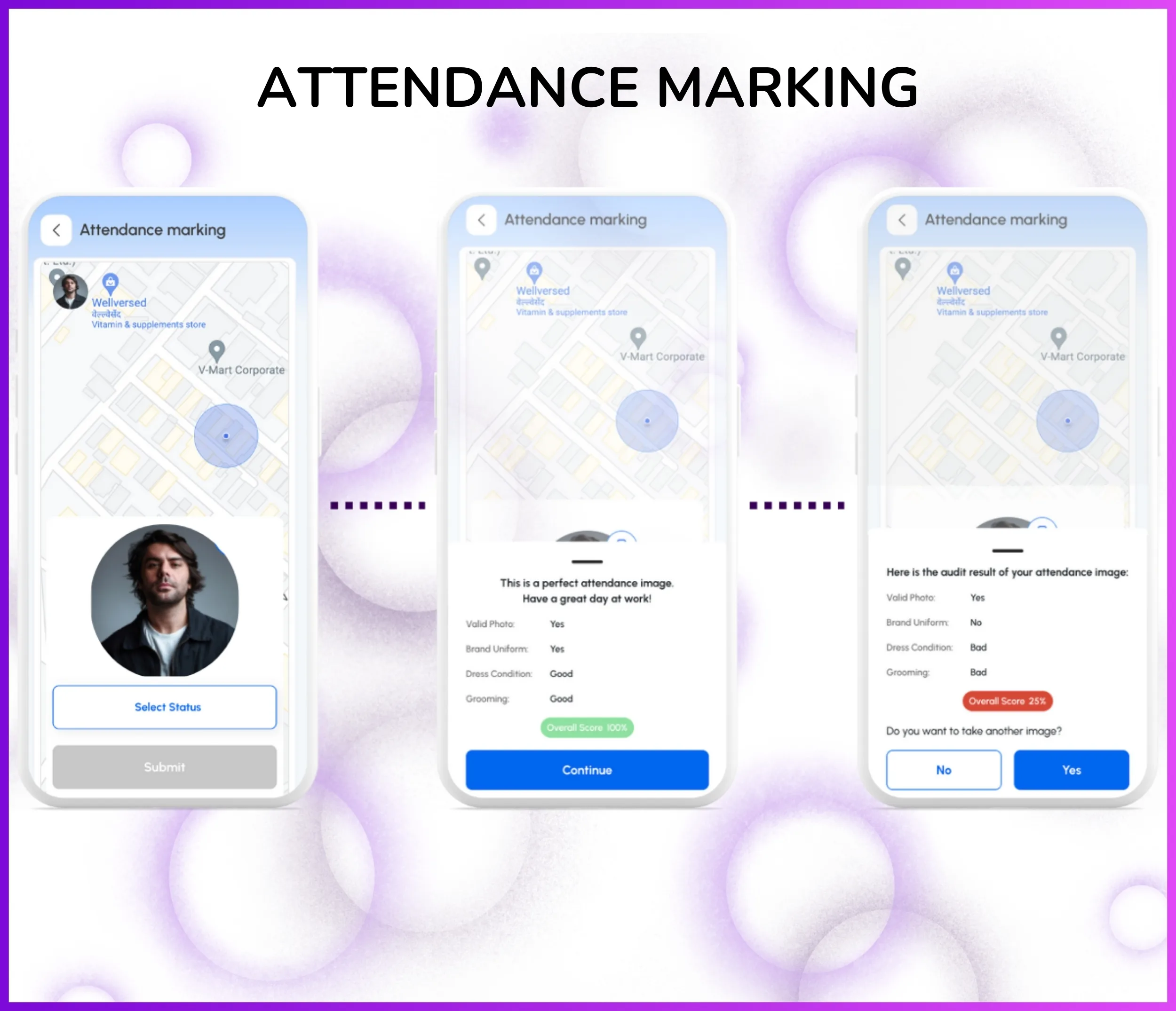
- Employee opens 1Channel mobile app and clicks "Mark Attendance"
- App captures live selfie photo with timestamp and GPS location
- AI verifies photo matches registered employee face (2-second verification)
- GPS validates employee is within configured radius of work location/office
- Attendance record syncs to admin portal dashboard in real-time
- Manager sees attendance status: Present, Absent, Late, Early Departure, Leave, Holiday
Key Attendance Features:
- GPS Geofencing — Define work location radius; attendance only allowed within configured geofence
- AI Photo Validation — Face recognition prevents proxy attendance (one employee marking for another)
- Late/Early Tracking — Configurable work hours with automatic late arrival and early departure detection
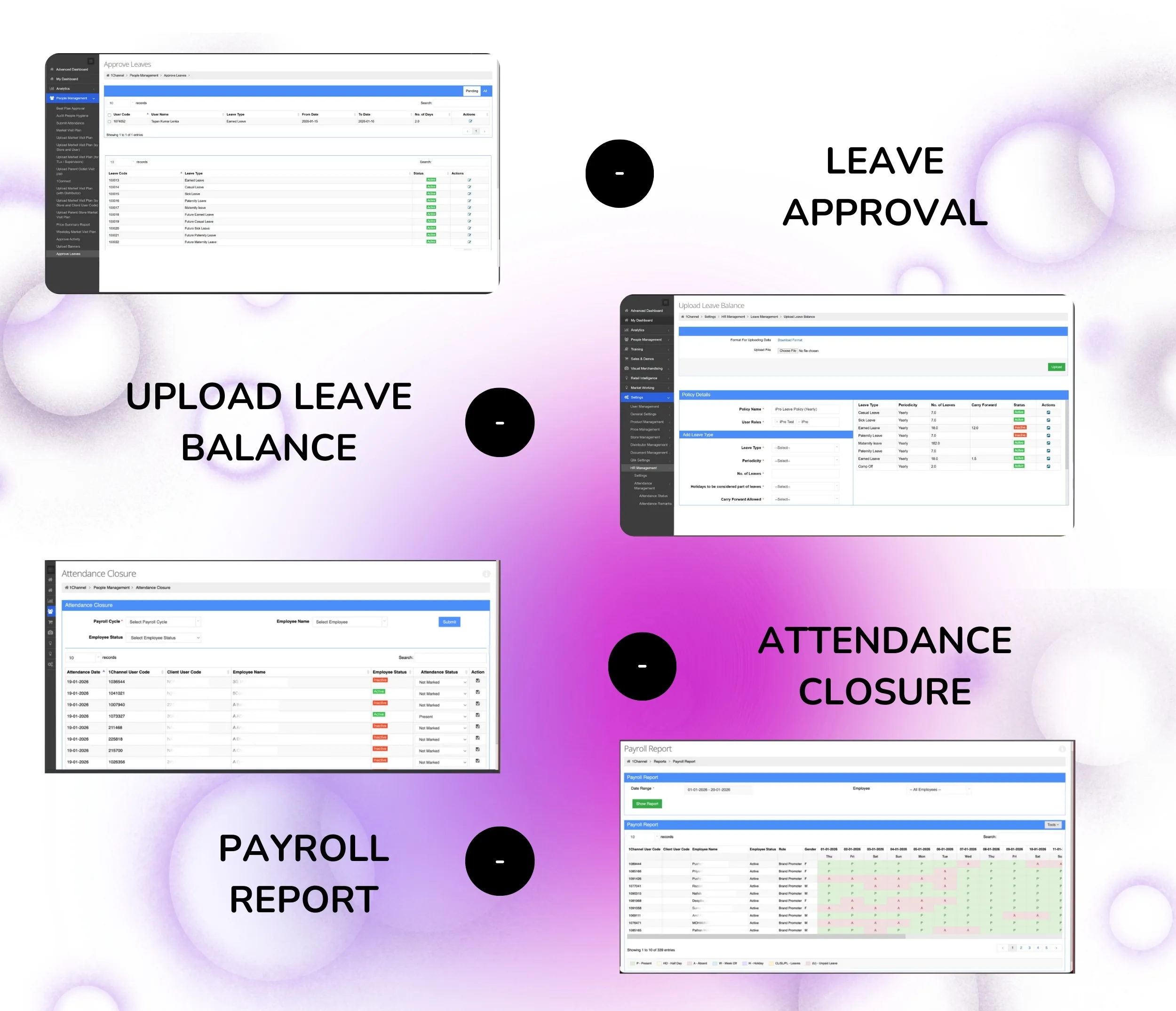
- Attendance Closure — Close attendance for payroll processing by month-end; syncs with salary calculation
- Real-Time Dashboard — View attendance status by employee, team, region with filters and Excel export
- Punch In/Out Logs — Track exact punch-in/punch-out times with location stamps for compliance audits
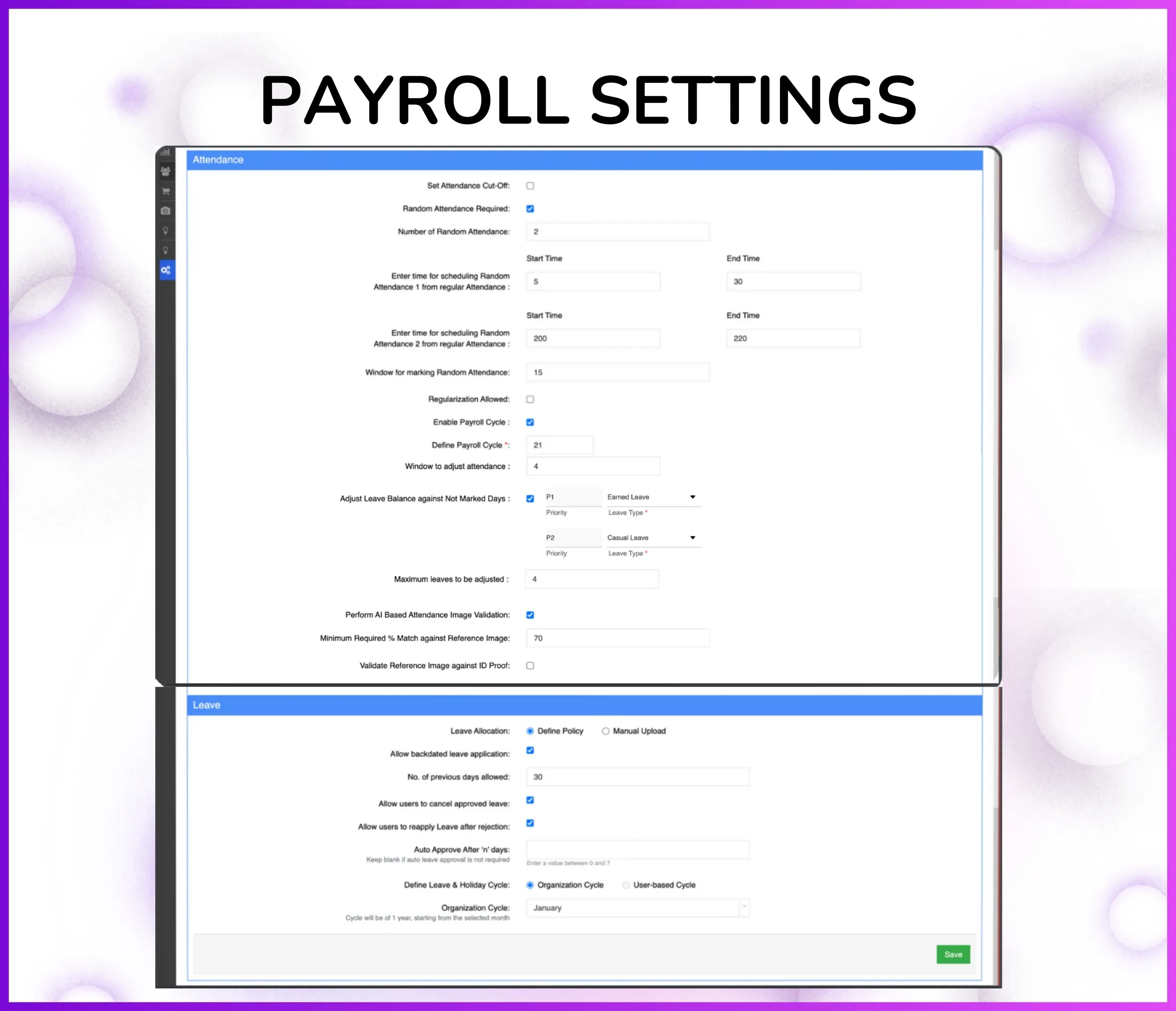
Note: Attendance policies (work hours, geofence radius, late thresholds) fully configurable per organization requirements.
Leave Management System
Complete leave management solution with leave type definitions, auto-allocation, approval workflows, balance tracking, and carry forward rules integrated with attendance and payroll systems.
Upload Leave Balance:
- Go to Settings → HR Management → Leave Management → Upload Leave Balance
- Download Excel template with columns: Employee Code, Leave Type, Opening Balance
- Fill employee leave balances (e.g., Ayush → Casual Leave: 10, Earned Leave: 15)
- Upload filled Excel file to system
- System validates employee codes and leave types before import
- Initial leave balance set for all employees in one bulk upload
Download Leave Balance:
- Go to Settings → HR Management → Leave Management → Download Leave Balance
- Download Excel report with columns: Employee Code, Employee Name, Leave Type, Opening Balance, Used Leaves, Available Balance
- Real-time leave balance showing current status for all employees
- Useful for payroll integration and monthly leave reports
- Filter by leave type or employee to check specific balances
Note: Leave balance updates in real-time after every approved/rejected leave application.
Expense & Reimbursement Management
End-to-end expense and reimbursement workflow where employees submit claims for work-related expenses with receipts, and approvals route to reporting heads based on organization hierarchy.
How Expense Management Works:
- Employee submits expense claim in mobile app with receipt photo/PDF upload
- Selects expense category: Travel, Food, Accommodation, Fuel, Client Entertainment, etc. (categories fully configurable)
- Enters expense amount, date, and description (e.g., "Client meeting lunch in Mumbai")
- System automatically routes claim to reporting head based on organization hierarchy
- Manager reviews expense details, receipt proof, and approves/rejects claim
- Approved expense automatically syncs to payroll for reimbursement processing
Configurable Expense Categories & Policies:
- Expense categories — configure Travel, Food, Accommodation, Fuel, Local Conveyance, Client Entertainment, Office Supplies
- Approval workflows — single-level or multi-level approvals based on expense amount thresholds
- Receipt requirement — mandatory receipt upload for expenses above configured amount (e.g., ₹500)
- Category-wise limits — set maximum reimbursement per category (e.g., Food: ₹500/day, Accommodation: ₹3000/night)
- Advance vs. Reimbursement — employees can request travel advances before trip or submit reimbursement after
Note: Expense policies fully configurable per organization's reimbursement guidelines and approval matrix.
Workforce Planning & Beat Management
Beat plan approval and workforce scheduling where managers assign daily or weekly routes to field teams with territory assignment and compliance tracking.
How Beat Planning Works:
- Field employee creates daily or weekly beat plan in mobile app
- Selects retailers/outlets to visit from assigned territory with route sequencing
- Adds expected visit time, purpose (order collection, stock check, merchandising), and planned activities
- Submits beat plan for manager approval via organization hierarchy
- Manager reviews planned visits, checks territory coverage, and approves/rejects beat plan
- Approved beat plan becomes employee's daily work schedule with GPS tracking during execution
Workforce Scheduling & Territory Management:
- Territory assignment — map employees to specific geographic territories with outlet/retailer lists
- Route optimization — AI-powered route sequencing to minimize travel time between visits
- Beat compliance tracking — real-time tracking of planned vs. actual visits with completion percentage
- Shift-based scheduling — support for multiple shifts with attendance and leave integration
- Workforce analytics — reports on territory coverage, visit frequency, and employee productivity
Note: Beat plans integrate with attendance tracking to ensure visit execution aligns with approved schedules.
Employee Data & Organization Hierarchy
Centralized employee database with user creation, role assignment, organization tree showing reporting hierarchy, and complete user attribute management from admin portal.
Creating Users & Assigning Roles:
- Admin goes to Settings → User Management → Create New User
- Enters employee details: Name, Email, Phone Number, Employee Code, Joining Date
- Assigns role: Promoter, Team Leader, Area Manager, Regional Manager, Admin (roles fully configurable)
- Maps reporting hierarchy: Select "Reports To" from organization tree (e.g., Ayush reports to Ravi)
- Assigns territory/location: Delhi NCR, Mumbai West, Bangalore South, etc.
- Sets user attributes: Department, Designation, Branch, Cost Center, Employee Type (Full-time/Contract)
Organization Hierarchy Visualization:
- View entire organization structure in tree/chart format with reporting relationships
- Example hierarchy: Regional Manager (Amit) → Area Manager (Priya) → Team Leader (Ravi) → Promoters (Ayush, Rahul, Neha)
- Click any employee node to see direct reports, leave balance, attendance percentage, and performance metrics
- Filter hierarchy by region, department, or branch to view specific organizational units
- Export organization chart as PDF for HR documentation and statutory compliance
- Hierarchy automatically drives approval workflows for leave, expenses, and beat plans
Note: Organization hierarchy updates reflect immediately across all modules (attendance, leave, expense approvals).
Holiday Calendar Management
Upload and manage company holiday calendars visible to all employees in mobile app for leave planning and attendance visibility.
How It Works:
- Admin goes to Settings → HR Management → Leave Management → Holiday Calendar
- Downloads Excel template with columns: Holiday Date, Holiday Name, Region (optional)
- Fills company holidays (e.g., 26-Jan-2025 | Republic Day | All India)
- Uploads filled Excel file to system
- Holidays become visible to all employees in mobile app calendar
- When employee selects leave dates, app shows holidays falling in selected range
Region-Wise Holiday Calendars:
- National holidays — visible to all employees across all regions (Republic Day, Independence Day)
- Regional holidays — specific to state/city (e.g., Maharashtra Day only for Mumbai employees)
- Example: Employee in Mumbai sees both national holidays + Maharashtra-specific holidays
- Filter holidays by region when uploading Excel (Region column: Delhi, Mumbai, Bangalore, etc.)
- Employees automatically see holidays for their assigned region based on location mapping
Note: Holiday calendar updates reflect immediately in mobile app for all employees.
HR Analytics & Reporting
Comprehensive HR analytics dashboard with real-time workforce metrics, attendance trends, leave patterns, expense summaries, and compliance reports for data-driven HR decisions.
Real-Time HR Analytics Dashboard:
- Attendance metrics: Daily attendance percentage, late arrivals, early departures, no-shows by employee/team/region
- Leave analytics: Leave utilization trends, most requested leave types, pending approvals, leave balance summaries
- Expense tracking: Total expense claims submitted, approved amounts, pending approvals, category-wise expense breakdown
- Workforce utilization: Beat plan compliance, territory coverage percentage, active vs. inactive employees
- Payroll readiness: Attendance closure status, expense reimbursements pending, leave deductions for salary calculation
- Compliance reports: Statutory leave reports, attendance registers, employee master data exports
Customizable Reports & Data Export:
- Date range filters — generate reports for daily, weekly, monthly, quarterly, or custom date ranges
- Multi-level filtering — filter by employee, team, department, region, branch, or role
- Excel exports — download attendance sheets, leave reports, expense summaries in Excel format
- Scheduled reports — auto-email weekly attendance summary or monthly HR analytics to management
- Visual dashboards — charts and graphs for attendance trends, leave patterns, and expense analysis
Note: All HR reports sync real-time with attendance, leave, and expense data for accurate workforce insights.
Who Uses HR Management Software in India?
Perfect for organizations managing distributed workforces across industries requiring comprehensive HR automation—attendance tracking, leave management, expense claims, workforce planning, and analytics.
- Field Sales Teams – Complete HR management for 25,000+ distributed promoters: GPS attendance, leave tracking, beat plans, expense claims, and org hierarchy
- Retail Chain Operations – Multi-store HR operations across 5,000+ outlets with attendance tracking, shift management, leave approvals, and workforce analytics
- Manufacturing Plants – Shift-based attendance, leave management, workforce scheduling, and payroll integration for factory workers
- FMCG & CPG Companies – Territory-wise attendance, beat plan approvals, expense tracking, and leave management integrated with attendance closure
- Healthcare Organizations – Medical staff attendance, shift scheduling, leave workflows (Maternity/Paternity), and hospital hierarchy management
- IT & Software Companies – Office attendance, work-from-home tracking, leave management, and HR analytics for engineering teams
- BPO & Call Centers – Shift-wise attendance tracking, leave management, and real-time workforce analytics for customer service teams
- Logistics & Distribution – Field attendance with GPS, beat plans for delivery routes, expense claims, and leave tracking for warehouse and delivery staff
Other 1Channel Solutions for Sales Teams
Sales Force Automation Software
Complete field sales management with order booking, distributor management, and beat planning.
CRM Software
Manage customer relationships, track interactions, and automate sales pipelines.
Loyalty Management Software
Channel partner and influencer loyalty programs with rewards and points redemption.
Retail Execution Software
Merchandising, shelf audits, planogram compliance, and retail visibility tracking.
LMS for Sales Teams
Training, onboarding, certification, and knowledge assessments for field teams.
Workforce Management Software
Beat planning, attendance closure, leave management, and claim approvals for distributed teams.
Sales Analytics & Reporting
Real-time dashboards, custom reports, and business intelligence for sales teams.
Store & Outlet Management
Outlet database, visit tracking, and store-level performance monitoring.
Leave Management Software
Leave requests, approvals, regularization workflows, and auto-allocation for field teams.
Expense & Claim Management
Travel expenses, reimbursements, receipt uploads, and approval workflows.
Field Activity & Questionnaire
Custom forms, surveys, audits, and field data collection tools.
Sales Scheme Management Software
Promotional schemes, incentives, discounts, and trade marketing campaigns.
Attendance & Time Tracking Software
GPS attendance marking, photo validation, AI face recognition, and payroll integration.
Customers Speak
With 1Channel, we've achieved 100% digitisation in sales team movement, order management, and inventory visibility, transforming the way we operate. The most beautiful thing about 1Channel is its ability to be completely customised to meet our organisation's unique requirements.

Watch Video1Channel is one of the best CRM software for field teams. It helps us collect data from over 100 field salespeople across the Gulf region and send instant analytical reports. When we walk into the office in the morning, the automatic sales reports are already waiting in our mailbox.

Thanks to 1Channel SFA tool, we have managed to automate our manual sales process across Asia and Australia into a mobility-based solution, with details of every account over the cloud. Key account managers can see results, any time, across the region.

1Channel SFA tool has made a huge impact on our sales reports, making it easy to track number of customer visits with realistic numbers. The support has been excellent. I am glad to be working with the right partner who understands our requirements.

Before 1Channel CRM software, we evaluated many sales CRM apps and choose them over the others for the innumerable configuration options that meet our business requirements. It is now very easy for us to manage field sales operations in a simple click.

Rewards and Recognition
Our recognitions constantly motivate us to push the envelope of excellence and empower our customers with winning ideas each day.