Managing field sales teams becomes increasingly complex when hundreds or thousands of retail outlets must be covered regularly. Without a structured approach, store visits may be missed, duplicated, or executed inconsistently.
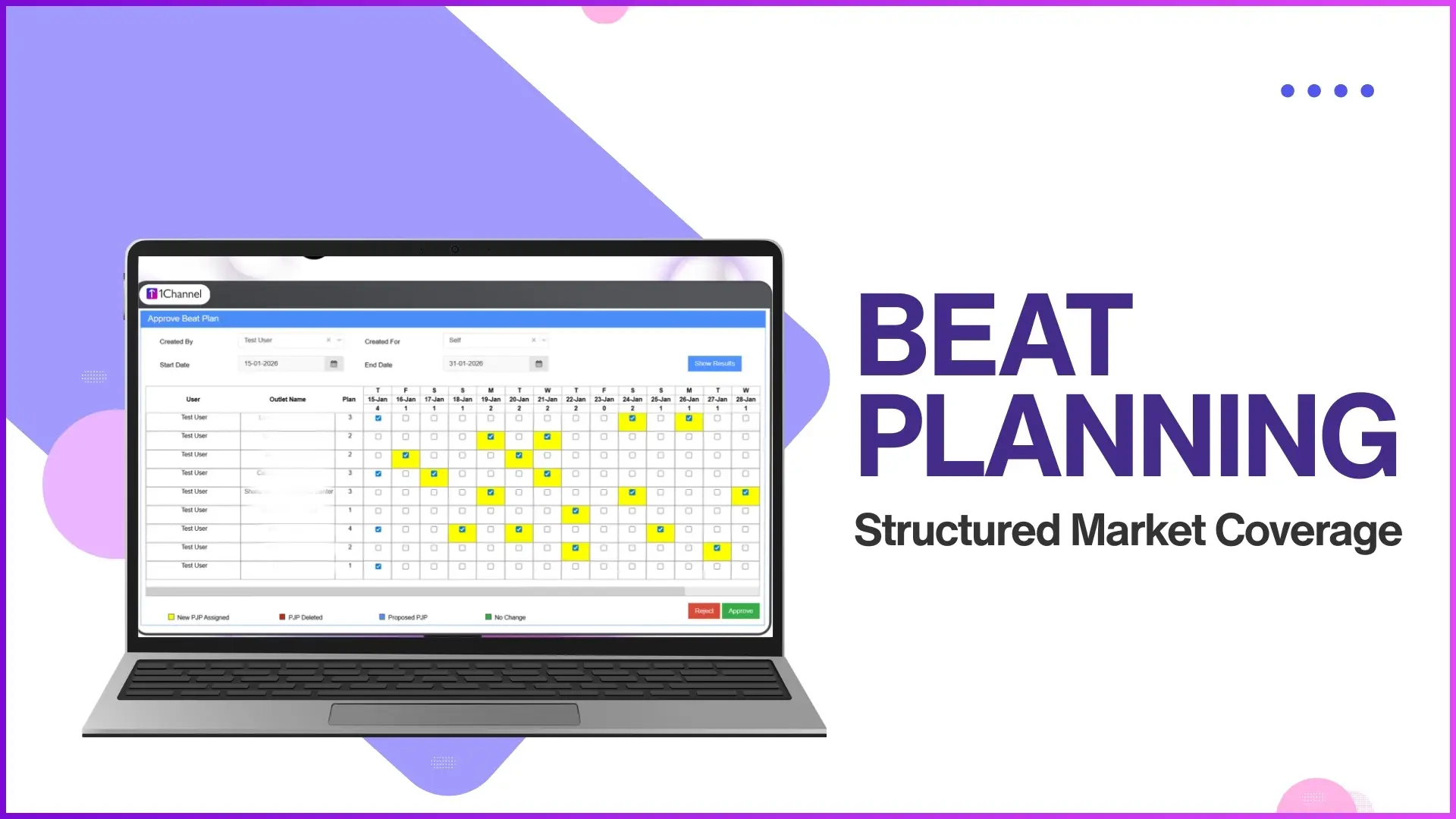
Store-wise visit scheduling brings clarity and control by defining which store is visited, by whom, and on which day.
Within a Sales Force Automation (SFA) system, store-wise visit scheduling is handled through the Market Visit Plan, ensuring disciplined execution and measurable field activity.

What Is Store-Wise Visit Scheduling?
Store-wise visit scheduling is the process of assigning specific retail outlets to field users with predefined visit days. Instead of vague area-based routes, visits are planned store by store, ensuring each outlet receives attention as per business requirements.
In the SFA system, this scheduling is centrally managed by admins or managers and followed by field users through the mobile application.
How Store-Wise Scheduling Works in the SFA System
Store-wise visit scheduling is managed through the Market Visit Plan module available in the People Management section.
1. Market Visit Plan Creation
Admins or program managers can upload market visit plans using multiple structured methods, such as:
- Upload Market Visit Plan
- Upload Market Visit Plan by Store and User
- Upload Market Visit Plan with Distributor
- Upload Market Visit Plan by Store and Client User Code
This flexibility allows businesses to define visit schedules exactly as per operational needs.
2. Store-Wise and Day-Wise Allocation
Each store can be assigned a specific visit day.
For example:
- Store A → Monday
- Store B → Wednesday
- Store C → Friday
This ensures that field users know exactly which store to visit on which day, reducing confusion and missed visits.
3. Weekday Market Visit Planning
The system also supports Weekday Market Visit Plans, where visits are structured according to weekdays (Monday to Sunday).
This approach helps standardize weekly routes and ensures repeatable, predictable field execution.
Ready to optimize your field visit planning?
Automate store-wise visit scheduling and streamline workforce management with 1Channel SFA.
Explore Workforce Management SoftwareExample of Store-Wise Visit Scheduling
Consider a promoter managing multiple retail outlets in a city:
- On Monday, the promoter is scheduled to visit three specific stores.
- On Tuesday, a different set of stores is assigned.
- Each store appears in the user's visit plan for that specific day only.
The promoter follows this plan through the SFA mobile application, and all visits are tracked against the predefined schedule.
Execution Through the Field Sales App
Once the store-wise visit plan is uploaded:
- Field users can view their assigned stores directly in the mobile application.
- Visits are performed according to the planned schedule.
- Activities carried out during the visit are recorded and sent back to the portal for reporting and analysis.
This ensures alignment between planning and execution.
Monitoring Store-Wise Visit Compliance
The system provides reports to track how well store-wise scheduling is followed.
Market Visit Plan Report
This report allows admins to:
- Download planned visit data for a selected date range
- Compare planned visits against actual execution
- Filter data by city, channel, category, and more
This visibility helps identify gaps in coverage and improve future planning.
Benefits of Store-Wise Visit Scheduling
Improved Visit Discipline
Field users follow a predefined structure, reducing missed or random visits.
Better Store Coverage
Every store is planned into the visit cycle, ensuring consistent engagement.
Clear Accountability
Each store is mapped to a user and a visit day, making ownership transparent.
Data-Driven Decisions
Planned vs actual visit data helps managers refine routes and workloads.
Role of Admins and Managers
Admins and managers control:
- Store assignment
- Visit days
- Upload and approval of visit plans
Field users are expected to strictly follow the approved plans, ensuring uniform execution across teams.
Ready to streamline your field sales operations?
Implement structured visit scheduling and boost field productivity with 1Channel SFA.
Explore Sales Force AutomationFAQs
What is the Market Visit Plan?
The Market Visit Plan defines which stores a field user must visit and on which days, helping structure daily and weekly field activities.
Can visits be planned store-wise instead of area-wise?
Yes. The system allows detailed store-wise bifurcation, assigning individual stores to specific visit days.
Can visit plans be uploaded in bulk?
Yes. Admins can upload visit plans using bulk upload options based on store, user, distributor, or client user code.
How are planned visits tracked?
Planned visits can be tracked using reports like the Market Visit Plan Report and other visit productivity reports.
Do field users see their visit schedules?
Yes. Field users access their assigned store visits through the SFA mobile application.
Conclusion
Store-wise visit scheduling brings structure, accountability, and visibility to field sales operations. By planning visits at the store level and linking them to specific days, organizations can ensure disciplined execution and measurable performance.
With a centrally managed Market Visit Plan and strong reporting support, field sales teams can move from reactive visits to well-planned, data-driven field execution.